
Trigonometric Ratios Demo by Speakmath
Loading the math board and drawing, please wait…
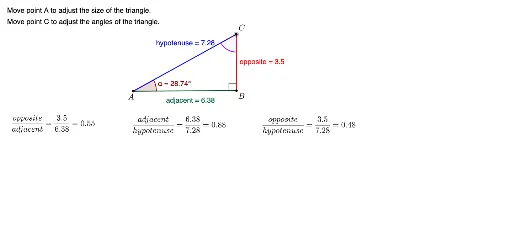
This example demonstrates the calculation and visualization of trigonometric ratios (sine, cosine, tangent) for a given angle. It involves core concepts like right triangles, side-angle relationships, and trigonometric functions. Constructed using GeoGebra commands such as Ray, Point, Segment, OrthogonalLine, Polygon, Angle, and Distance. Ideal for high school mathematics education to understand trigonometric definitions and practical applications.
GeoGebra Commands & Parameters
Ray(B, B_1) → a_1Point(a_1) → ASegment(A, B) → adjacentOrthogonalLine(B, adjacent) → c_2Point(c_2) → DRay(B, D) → dPoint(d) → CPolygon(C, A, B) → poly1, hypotenuse, e, oppositeAngle(B, A, C) → αAngle(A, C, B) → βAngle(C, B, A) → γDistance(adjacent, opposite) → a
AI Drawing Prompt Reference
Draw a right triangle ABC with point B as the right angle, point A to the right of B, and point C above B. Draw a line from B perpendicular to AB, intersecting at D. Connect C and B to form the hypotenuse. Label the angle BAC as α, angle ACB as β, and angle CBA as γ. Measure the length of AB as the adjacent side length, and the length of BC as the opposite side length.
The prompt above was compiled from the original drawing commands and is for reference only.