
Trigonometric Ratios Demo by murphy_w
Loading the math board and drawing, please wait…
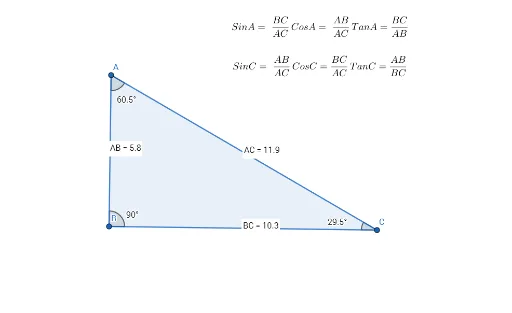
This example dynamically demonstrates the relationships between angles and side lengths in a triangle, visually illustrating the definitions of trigonometric functions. It involves core math concepts like trigonometry (sine, cosine, tangent), angle measurement, and side length calculation. The construction uses GeoGebra commands and objects such as Polygon, Angle, Distance, and Midpoint to build the triangle and label key elements. Suitable for high school mathematics teaching to help students understand the basic principles of trigonometric functions and their geometric significance.
GeoGebra Commands & Parameters
Polygon(A, B, C) → t1, c, a, bAngle(A, B, C) → αAngle(A, C, B) → βAngle(C, A, B) → γDistance(B, C) → distanceBCMidpoint(B, C) →Distance(A, C) → distanceACMidpoint(A, C) →Distance(A, B) → distanceABMidpoint(A, B) →
AI Drawing Prompt Reference
Draw a triangle and label its three interior angles and three side lengths to dynamically demonstrate the relationship between angles and side lengths, illustrating the definitions of trigonometric functions. First, construct the triangle, then measure and label the sizes of the three angles, followed by measuring and labeling the lengths of the three sides, and finally display this information clearly to visually understand the geometric significance of trigonometric functions.
The prompt above was compiled from the original drawing commands and is for reference only.