
Trigonometric Ratios Construction
Loading the math board and drawing, please wait…
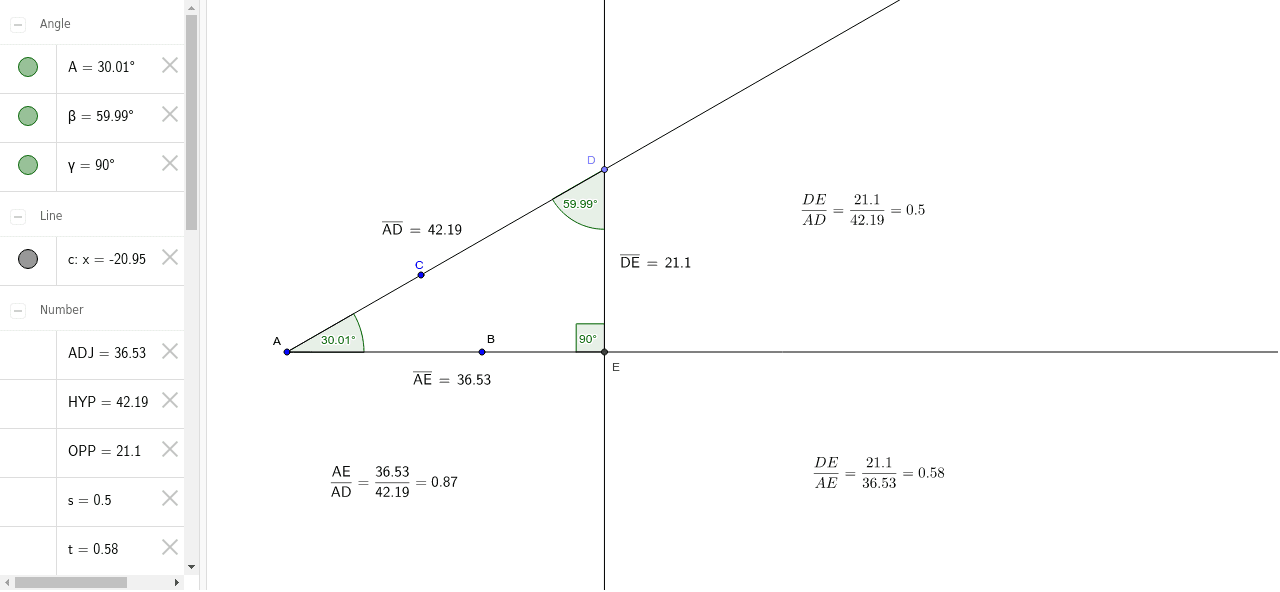
This GeoGebra example demonstrates the construction of trigonometric ratios (sine, cosine, tangent) in a right triangle, illustrating the relationship between angles and side lengths. Core mathematical concepts include right-triangle trigonometry, angle-side correspondence, and proportional reasoning. Construction uses GeoGebra commands such as Ray, Point, OrthogonalLine, Intersect, Angle, and Distance, with objects labeling opposite, adjacent, and hypotenuse sides. Suitable for middle and high school mathematics, it helps students visualize and understand the definition and calculation of trigonometric ratios through dynamic geometry.
GeoGebra Commands & Parameters
Ray(A_1, C) → aRay(A_1, B) → bPoint(a) → DOrthogonalLine(D, b) → cIntersect(c, b) → EAngle(B, A_1, C) → AAngle(A_1, D, E) → βAngle(D, E, A_1) → γDistance(D, E) → OPPDistance(A_1, E) → ADJDistance(A_1, D) → HYP
AI Drawing Prompt Reference
Draw an angle with its vertex at the origin and two rays extending outward. Choose a point on one ray, then construct a line through that point perpendicular to the other ray; let the foot of the perpendicular intersect the second ray, forming a right triangle. Label the hypotenuse, adjacent side, and opposite side of this triangle relative to the vertex angle, representing the sine, cosine, and tangent ratios.
The prompt above was compiled from the original drawing commands and is for reference only.