
Trigonometric Ratios by np2cmath
Loading the math board and drawing, please wait…
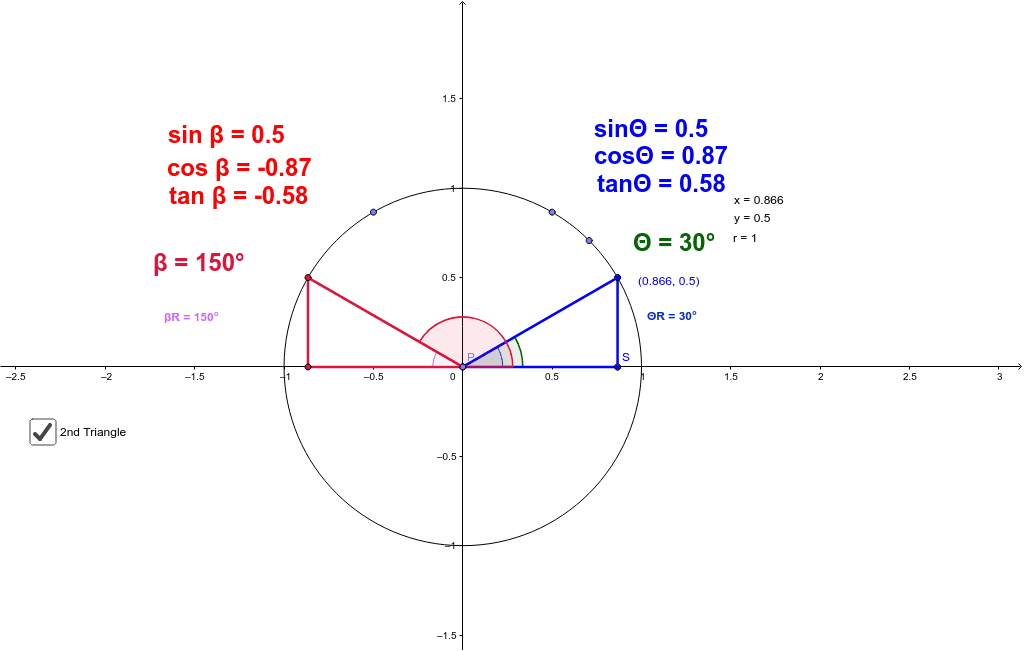
This example demonstrates the concept of trigonometric ratios. Key mathematical concepts include sine, cosine, and tangent. Using GeoGebra commands such as Intersect, Circle, and Point, the relationship between angles and trigonometric values is dynamically illustrated. Suitable for high school mathematics education and learning.
GeoGebra Commands & Parameters
Intersect(xAxis, yAxis) → ACircle(A, B) → cPoint(c) → DDynamicCoordinates(D, If[Distance[D, I] < z, x(I), If[Distance[D, J] < z, x(J), If[Distance[D, K] < z, x(K), x(D)]]], If[Distance[D, I] < z, y(I), If[Distance[D, J] < z, y(J), If[Distance[D, K] < z, y(K), y(D)]]]) → CSegment(A, C) → aAngle(xAxis, a) → ΘSegment(C, E) → bPoint(xAxis) → GSegment(F, G) → dAngle(a, d) → αPoint(d) → HAngle(d, a) → βAngle(a, xAxis) → γAngle(xAxis, a) → δSegment(H, E) → ePoint(a) → PPoint(c) → QSegment(P, Q) → fPoint(e) → SSegment(P, R) → gSegment(R, Q) → hAngle(xAxis, f) → εAngle(xAxis, f) → ζAngle(f, xAxis) → ηAngle(Q, P, R) → θAngle(R, P, Q) → ι
AI Drawing Prompt Reference
Draw a right triangle with one leg on the x-axis and the other leg intersecting a circle. Mark the intersection point as D, and draw a tangent from D to the circle, intersecting the x-axis at point G. Connect D and G to form the hypotenuse of the right triangle. Label the three angles of the right triangle as α, β, and γ, and mark point H on the hypotenuse. Connect H and point E on the circle to form line segment e. Connect point E and the circle's center Q to form line segment f. Connect Q and D to form line segment g. Connect D and E to form line segment h. Label the three angles of the right triangle as ε, ζ, and η, and mark the angle θ formed by points Q, P, and R, and angle ι.
The prompt above was compiled from the original drawing commands and is for reference only.