
TRIG Functions with Radicals
Loading the math board and drawing, please wait…
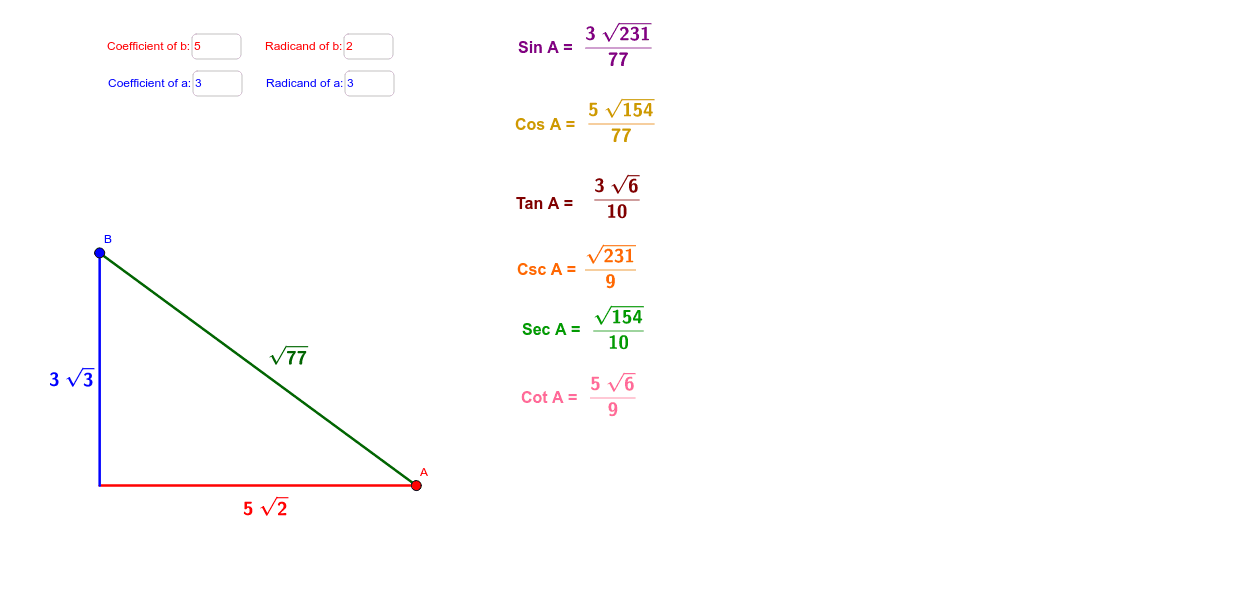
This example demonstrates all trigonometric functions of a right triangle involving radicals. It covers core concepts like trigonometric definitions, Pythagorean theorem, and radical operations. GeoGebra commands like Textfield, If, Segment, SurdText, and Midpoint are used to construct the triangle, calculate midpoints, and display function values. Ideal for high school mathematics education to understand the practical application of trigonometric functions in right triangles.
GeoGebra Commands & Parameters
Textfield(a) → inputBox1Textfield(b) → inputBox2Textfield(c) → inputBox3Textfield(d) → inputBox4If(b > 0, ((a * sqrt(b)), 0), (a, 0)) → AIf(d > 0, (0, (c * sqrt(d))), (0, c)) → BSegment(O, A) → eSegment(O, B) → fSurdText((a * sqrt(b))) → text1SurdText((c * sqrt(d))) → text2Segment(A, B) → gMidpoint(e) → CMidpoint(f) → DMidpoint(g) → ESurdText(g) → text3SurdText(f / g) → text4SurdText(e / g) → text5SurdText(f / e) → text6SurdText(g / f) → text7SurdText(g / e) → text8SurdText(e / f) → text9
AI Drawing Prompt Reference
Draw a right triangle with labeled sides, and calculate the midpoints of each side. Label the lengths of the sides and the values of the functions, including the square roots of the side lengths, ratios of side lengths, and ratios of function values. Use different colors to distinguish the sides and key points, and clearly show the application of trigonometric functions in right triangles, including the definitions and calculations of sine, cosine, and tangent functions.
The prompt above was compiled from the original drawing commands and is for reference only.