
Intersection of Two Lines by Tony Jacobsen
Loading the math board and drawing, please wait…
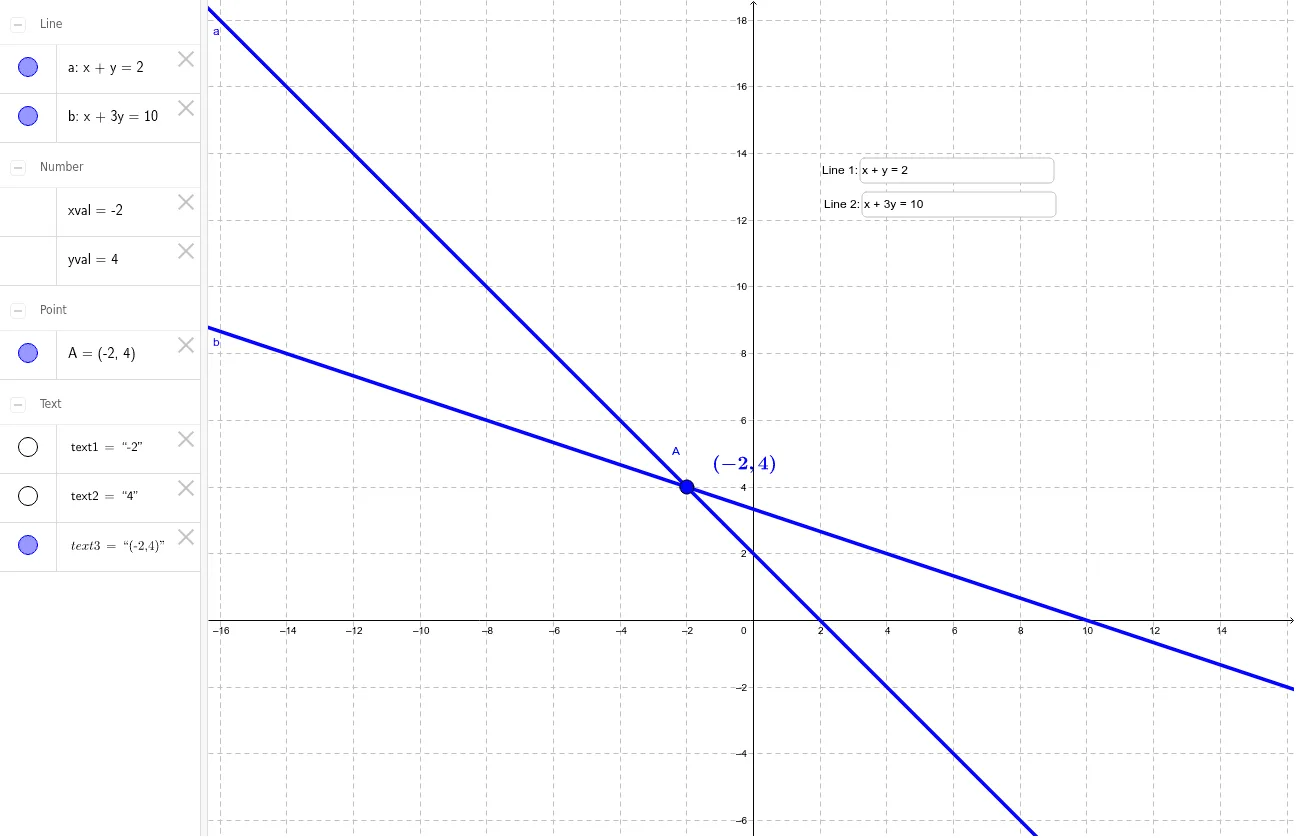
This GeoGebra example allows users to input two linear equations via interactive input boxes. It then computes and displays their intersection point in exact fractional form. The core mathematical concepts include linear equations, coordinate geometry, and the algebraic solution of equation systems. Construction features the Intersect command to find the intersection point, Textfield and SurdText commands to display fractional results, and inputBox1 and inputBox2 for editable equation entry. Relevant objects include coefficients a and b, and the intersection coordinates xval and yval. The example is suitable for middle and high school mathematics, helping students visualize the geometric meaning of linear equations, understand the conditions for solutions of equation systems, and engage in classroom demonstrations or independent exploration.
GeoGebra Commands & Parameters
Intersect(a, b) → ASurdText(xval) → text1SurdText(yval) → text2Textfield(a) → inputBox1Textfield(b) → inputBox2
AI Drawing Prompt Reference
Create a coordinate geometry illustration with two editable linear equation input boxes. Draw the two corresponding straight lines in a Cartesian plane, mark their intersection point, and display the x-coordinate and y-coordinate of that point as exact fractions in nearby text. The layout should be clear for middle or high school mathematics, emphasizing how the geometric intersection of two lines corresponds to the algebraic solution of a system of linear equations.
The prompt above was compiled from the original drawing commands and is for reference only.