
Triangle with Symmetries
Loading the math board and drawing, please wait…
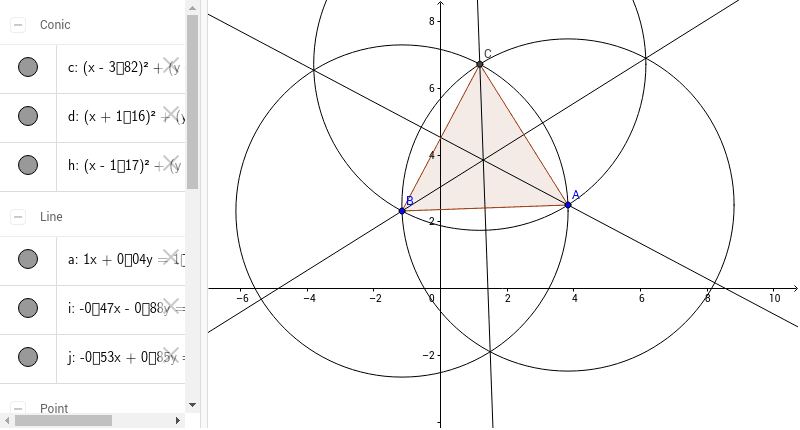
① This example demonstrates a triangle featuring various symmetry properties and related geometric figures. ② Core mathematical concepts include symmetry, geometric mean, step functions, cylinder, frequency distribution, and prism. ③ The construction uses GeoGebra commands such as Circle, Intersect, Polygon, and AngularBisector, involving objects like A, B, C, D, poly1, a_1, c_1, b, h, i, j, a to create the triangle, angle bisectors, circles, and intersections. ④ Designed for middle to high school students to explore geometric constructions and symmetry analysis.
GeoGebra Commands & Parameters
Circle(A, B) → cCircle(B, A) → dIntersect(c, d, 2) → CPolygon(C, B, A) → poly1, a_1, c_1, bCircle(C, B) → hAngularBisector(B, A, C) → iAngularBisector(C, B, A) → jAngularBisector(A, C, B) → a
AI Drawing Prompt Reference
Draw a triangle and display its angle bisectors, circumcircle, and related symmetry properties. Start by drawing two intersecting circles to find the third vertex of the triangle, then connect these points to form the triangle. Next, draw the angle bisectors for each angle and the circumcircle passing through the vertices and the intersection points of the bisectors. Finally, highlight the angle bisectors and circumcircle with dashed lines or different colors to emphasize symmetry.
The prompt above was compiled from the original drawing commands and is for reference only.