
Triangle Transformation: Exploring Geometric Properties via Transformations
Loading the math board and drawing, please wait…
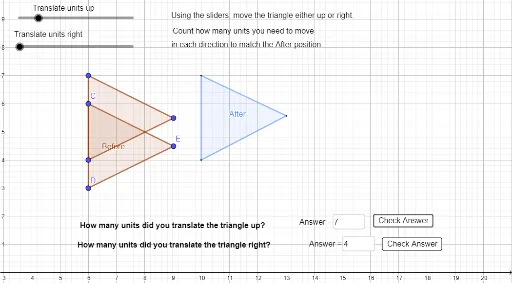
This example demonstrates how geometric transformations such as translation and dilation alter the shape and position of a triangle. Key mathematical concepts include triangle properties, vector transformations, and coordinate geometry. Construction involves using GeoGebra commands like Intersect, Polygon, Translate to build the triangle and apply transformations. Suitable for middle school or high school students learning geometric transformations and coordinate geometry, useful for teaching and self-exploration.
GeoGebra Commands & Parameters
Intersect(xAxis, yAxis) → APolygon(C, D, E) → Before, e, c, dVector(A, B) → uTranslate(C, u) → C'Translate(D, u) → D'Translate(E, u) → E'Polygon(C', D', E') → t1', e', c', d'Polygon(F, G, H) → t1, h, f, gTextfield(ansy) → InputBox1Textfield(ansx) → InputBox2
AI Drawing Prompt Reference
Draw a triangle and show its transformed positions via vector translation and dilation, highlighting how geometric transformations affect shape and position. Start by drawing the original triangle, then use a vector to represent the translation direction, apply translation to get a new triangle, and draw a scaled version of the triangle. Add input boxes for entering coordinate values.
The prompt above was compiled from the original drawing commands and is for reference only.