
Triangle to Rectangle: Equal-Area Transformation
Loading the math board and drawing, please wait…
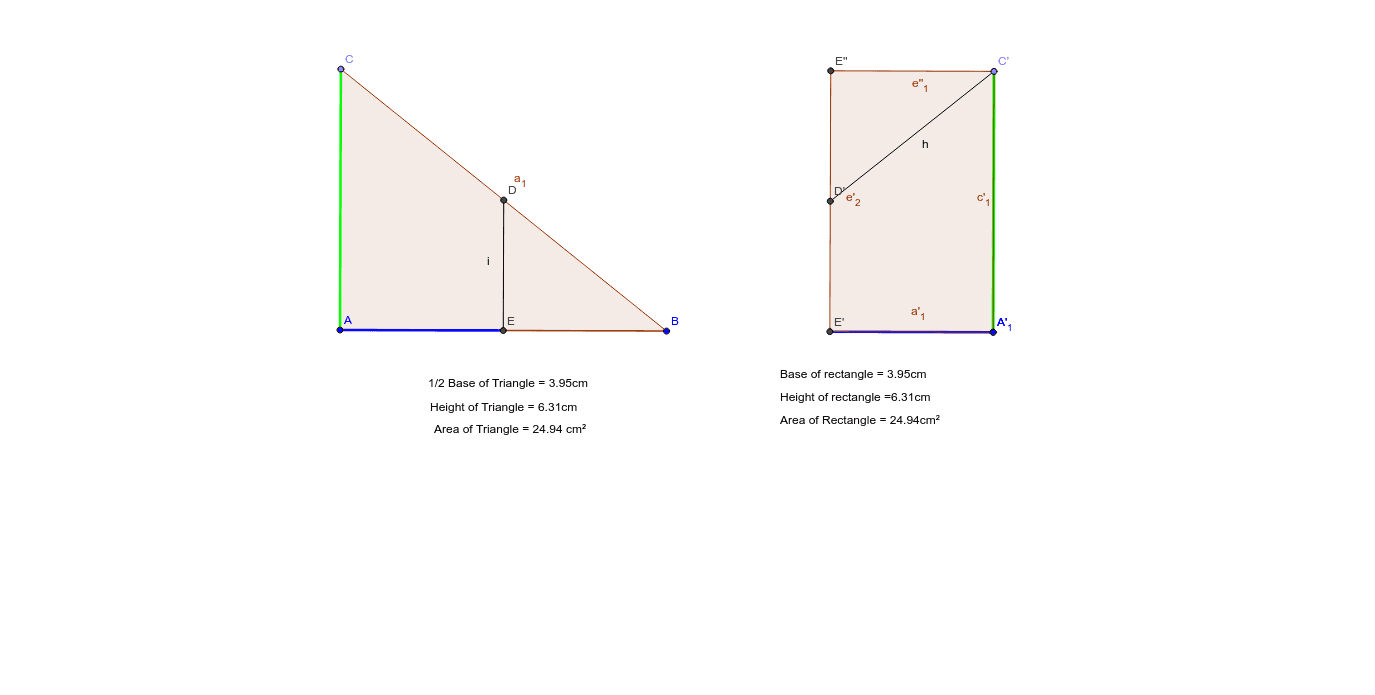
This GeoGebra example demonstrates how to transform a triangle into a rectangle of equal area through geometric construction, visually linking the area formulas of triangles and rectangles. The core mathematical concepts include area equivalence, triangle and rectangle area formulas, perpendicular lines, midpoints, and symmetry. The construction uses GeoGebra commands such as Line, OrthogonalLine, Point, Polygon, LineBisector, Intersect, Segment, Mirror, and PointIn to build the triangle and auxiliary lines. By drawing altitudes, finding midpoints, and applying reflections, the triangle is dissected and reassembled into a rectangle with the same area. This is ideal for middle school geometry lessons, helping students grasp area formula derivation and the idea of area-preserving transformations, and can serve as an interactive visual aid for dynamic geometric exploration.
GeoGebra Commands & Parameters
Line(A, B) → aOrthogonalLine(A, a) → bPoint(b) → CPolygon(C, B, A) → poly1, a_1, Base, b_1LineBisector(Base) → dIntersect(d, a_1) → DIntersect(d, a) → ESegment(A, E) → eMirror(A, B) → A'Mirror(E, B) → E'Segment(A', E') → e'OrthogonalLine(B, a) → fMirror(A, f) → A'_1Mirror(C, f) → C'Segment(A'_1, C') → gMirror(D, f) → D'Mirror(E', D') → E''Polygon(E'', C', A', E') → poly2, e'', c', a', e'_1Segment(D', C') → hSegment(D, E) → iPointIn(poly1) → Pointpoly1PointIn(poly2) → Pointpoly2Polygon(E', E'', C', A') → poly3, e'_2, e''_1, c'_1, a'_1
AI Drawing Prompt Reference
Draw a triangle and show how to transform it into a rectangle of equal area through geometric construction. Start with a horizontal base line, erect a perpendicular at one endpoint, and choose a point on this perpendicular as the triangle's apex. Connect the apex to both endpoints of the base to form the triangle. Find the midpoint of the base, draw a perpendicular through it, and intersect this with one side of the triangle to get a point. Connect this point to one endpoint of the base, creating a dividing segment. Reflect part of the triangle across the other endpoint of the base, then reflect across the perpendicular at the base's other endpoint, gradually reassembling the pieces into a rectangle with the same area as the original triangle. Place a point inside both the triangle and the rectangle to indicate correspondence.
The prompt above was compiled from the original drawing commands and is for reference only.