
Triangle Midsegment Properties
Loading the math board and drawing, please wait…
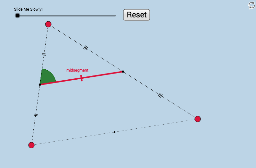
This applet dynamically illustrates two key properties of a triangle's midsegment: it is parallel to the third side and its length is half of that side. The demonstration involves core mathematical concepts such as line segments, midpoints, slopes, lengths, circles, intersections, geometric transformations, vectors, translations, and angles. It is constructed using GeoGebra commands like Segment, Midpoint, Slope, Length, FractionText, Circle, Intersect, Dilate, Vector, Translate, CircleSector, and Angle. Suitable for middle school students and above, this tool helps in understanding geometric transformations, proofs, and introductory coordinate geometry applications.
GeoGebra Commands & Parameters
Segment(A, B) → aSegment(B, C) → bSegment(C, A) → cMidpoint(c) → DMidpoint(b) → ESegment(A, D) → dSegment(D, C) → eSegment(C, E) → fSegment(E, B) → gSegment(D, E) → qSlope(q) → hSlope(a) → iLength(q) → jLength(a) → kFractionText(h) → text4Segment(A_1, B_1) → a_1Segment(B_1, C_1) → b_1Segment(C_1, A_1) → c_1Midpoint(c_1) → D_1Midpoint(b_1) → E_1Segment(A_1, D_1) → d_1Segment(D_1, C_1) → e_1Segment(C_1, E_1) → f_1Segment(E_1, B_1) → g_1Segment(D_1, E_1) → Midsegment_1Slope(Midsegment_1) → h_1Length(Midsegment_1) → j_1FractionText(h_1) → text4_1Slope(a) → lFractionText(Slope[q]) → text5FractionText(Slope[a]) → text6Midpoint(a) → FSegment(E, F) → nSegment(F, D) → pCircle(D, 1) → tCircle(A, 1) → k_1Intersect(t, p, 1) → JIntersect(k_1, a, 1) → KIntersect(t, q, 1) → ODilate(D, If[0 ≤ m < 1, 1 - m, 0], A) → D'Vector(D, D') → uDilate(D, If[1 ≤ m < 2, 2 - m, 0], A) → D'_1Vector(D, D'_1) → vTranslate(D, v) → D'_2Translate(E, v) → E'Segment(D'_2, E') → q'Dilate(D, If[2 < m < 3, 3 - m, 0], F) → D'_3Vector(D, D'_3) → wTranslate(D, w) → D'_4Translate(E, w) → E'_1Segment(D'_4, E'_1) → q'_1Segment(C, E) → rSegment(E, B) → sSegment(C, D) → i_1Segment(D, A) → l_1Circle(D, 1) → p_1Circle(A, 1) → q_1Intersect(q_1, a, 1) → GIntersect(q_1, l_1, 1) → HIntersect(p_1, q, 1) → IIntersect(p_1, i_1, 1) → LCircleSector(D, I, L) → r_1Dilate(D, If[0 ≤ m < 1, 1 - m, 0], A) → D'_5Vector(D, D'_5) → u_1Translate(r_1, u_1) → s_1Angle(E, D, C) → αCircleSector(D, L, O) → t_1Translate(t_1, u_1) → c_2
AI Drawing Prompt Reference
Draw triangle ABC and connect its midpoints D and E to form segment DE, observing its relationship with side BC. Then, draw triangle A'B'C' and connect its midpoints D' and E' to form segment D'E', observing its relationship with side B'C'. Finally, draw the midsegment DE of triangle ABC and the midsegment D'E' of triangle A'B'C', and observe their length and positional relationships.
The prompt above was compiled from the original drawing commands and is for reference only.