
Triangle Inequality Demonstration
Loading the math board and drawing, please wait…
In collections
学习 GeoGebra 经典应用
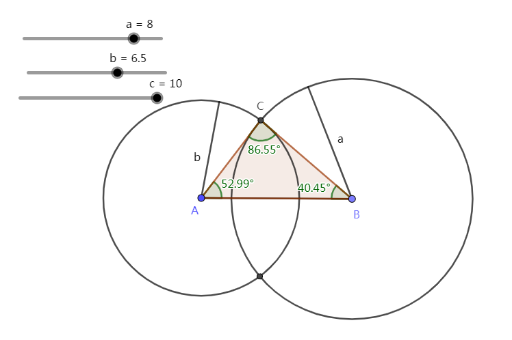
This example dynamically visualizes the triangle inequality by demonstrating the relationship between the sides and angles of a triangle. It involves core mathematical concepts such as the triangle inequality, side-angle relationships, and geometric construction. Key GeoGebra commands used include Point, Segment, Circle, Intersect, Polygon, Angle, and Midpoint to construct the triangle and calculate angles. Suitable for high school mathematics education to understand basic triangle properties and the application of inequalities.
GeoGebra Commands & Parameters
Point(Circle[A, c]) → BSegment(A, B) → fCircle(A, b) → dCircle(B, a) → eIntersect(d, e) → C, C_2, ,Polygon(A, B, C) → t1, c_1, a_1, b_1Angle(B, A, C) → αAngle(C, B, A) → βAngle(A, C, B) → γPoint(d) → DSegment(A, D) → gMidpoint(g) → EPoint(e) → FSegment(B, F) → hMidpoint(h) → G
AI Drawing Prompt Reference
Draw a triangle to demonstrate the triangle inequality. The triangle consists of three points: A, B, and C. Connect A and B to form segment f, connect A and C to form segment g, and connect B and C to form segment h. Calculate the three interior angles of triangle ABC: alpha, beta, and gamma. Find the midpoint E of segment g and the midpoint G of segment h. Ensure the triangle satisfies the triangle inequality, meaning the sum of any two sides is greater than the third side. The diagram should clearly show these relationships and be suitable for mathematical education.
The prompt above was compiled from the original drawing commands and is for reference only.