
Triangle Family
Loading the math board and drawing, please wait…
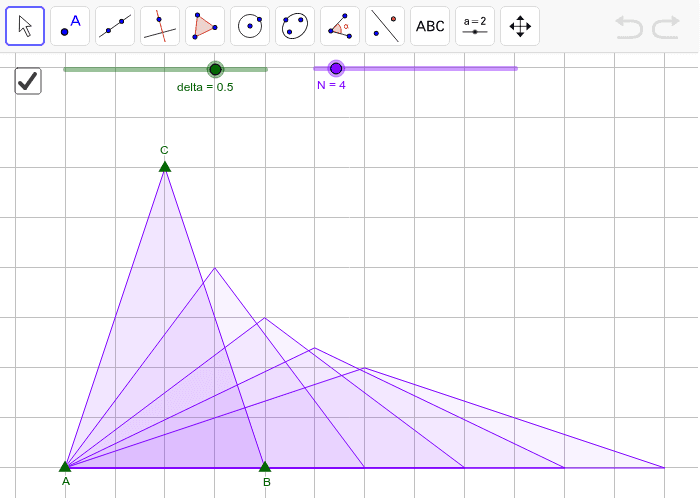
This example demonstrates a pattern of equal-area triangles. It involves core math concepts like area calculation, tangent function, calculus, median line, geometric distribution, and kite. Construction highlights include using Polygon, Sequence, Line, OrthogonalLine, and Intersect commands in GeoGebra. Suitable for high school and above learners exploring geometric constructions and calculus applications.
GeoGebra Commands & Parameters
Polygon(A, B, C) → poly1, c, a, bSequence(B + ((i * delta) * (B - A)), i, 1, N) → list1Line(A, B) → dOrthogonalLine(C, d) → eIntersect(e, d) → DSequence(A + ((D - A) * Distance[Element[list1, i], A] / Distance[A, B]) + ((u * 2) * poly1 / Distance[A, Element[list1, i]]), i, 1, N) → list2Sequence(Polygon[A, Element[list1, i], Element[list2, i]], i, 1, N) → list3
AI Drawing Prompt Reference
Draw a series of equal-area triangles. First, draw triangle ABC. Then, generate a series of points evenly distributed along line segment AB. From point C, draw a perpendicular line to AB and find the intersection point D. Using these points and point D, construct a series of new triangles, ensuring each new triangle has the same area as triangle ABC.
The prompt above was compiled from the original drawing commands and is for reference only.