
Triangle Construction - SAS Case
Loading the math board and drawing, please wait…
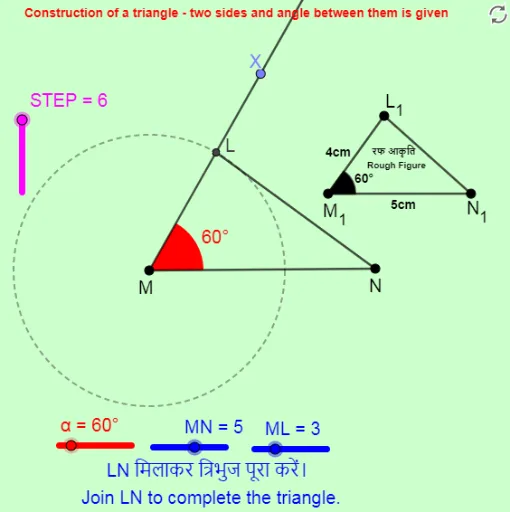
This example demonstrates how to construct a triangle given two sides and the included angle (SAS). The core math concepts involved include geometric construction, angle measurement, and triangle properties. Key construction steps utilize GeoGebra commands such as Point, Segment, Rotate, Angle, Ray, Circle, and Intersect. Suitable for middle school and above students to understand basic geometric construction techniques and triangle formation principles.
GeoGebra Commands & Parameters
Point(Circle[M, MN]) → NSegment(M, N) → fRotate(N, α, M) → XAngle(N, M, X) → βRay(M, X) → gCircle(M, ML) → cIntersect(c, g, 1) → LSegment(L, N) → hSegment(M_1, N_1) → iSegment(L_1, M_1) → jSegment(L_1, N_1) → kAngle(N_1, M_1, L_1) → γ
AI Drawing Prompt Reference
Draw a triangle given two sides and the included angle: start by drawing two line segments as the given sides, then rotate one side around the other to match the included angle, draw a circle with the radius equal to the shorter side centered at the endpoint of the longer side, find the intersection of the circle with the rotated line to determine the third vertex, and connect the three vertices to form the triangle, labeling the given sides and angle.
The prompt above was compiled from the original drawing commands and is for reference only.