
Triangle Construction Demo
Loading the math board and drawing, please wait…
In collections
Perimeter and Area in the Coordinate Plane (Triangles)
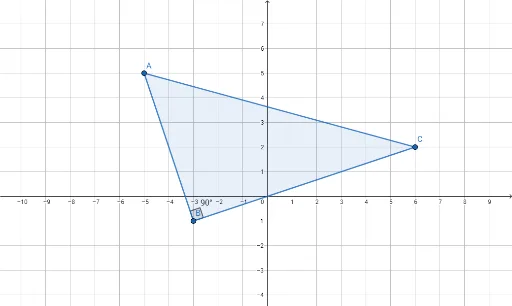
This example demonstrates how to construct a triangle in GeoGebra and display its key properties. It involves core mathematical concepts such as triangle vertices, angles, side lengths, and geometric construction. The construction uses commands like Polygon for triangle formation and Angle for angle measurement, with objects A, B, C, t1, c, a, b, α. Suitable for high school mathematics teaching, illustrating geometric construction and basic trigonometric function applications.
GeoGebra Commands & Parameters
Polygon(A, B, C) → t1, c, a, bAngle(A, B, C) → α
AI Drawing Prompt Reference
Draw a triangle ABC by connecting points A, B, and C to form triangle t1. Measure the angles between points A, B, and C and display them as angle α.
The prompt above was compiled from the original drawing commands and is for reference only.