
Triangle Congruence Exploration by Ben Graber
Loading the math board and drawing, please wait…
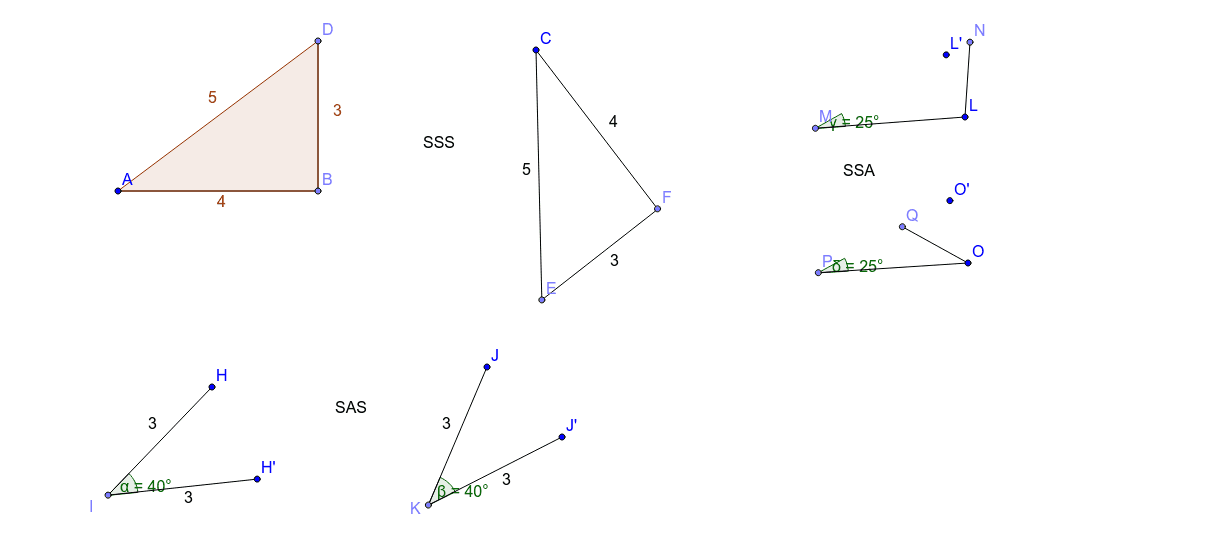
This example demonstrates the concept of triangle congruence using GeoGebra tools. Key mathematical concepts include triangle congruence, angle relationships, and geometric construction. The construction involves using commands like Point, Segment, Polygon, Rotate, and Angle to create triangles and verify congruence conditions. It is suitable for middle or high school students to understand geometric principles and enhance drawing skills.
GeoGebra Commands & Parameters
Point(Circle[A, 4]) → BSegment(A, B) → aPoint(Circle[B, 3]) → DSegment(B, D) → cPolygon(A, B, D) → poly1, d, a_1, bPoint(Circle[C, 5]) → ESegment(C, E) → ePoint(Circle[C, 4]) → FSegment(C, F) → fPoint(Circle[E, 3]) → GSegment(E, G) → gPoint(Circle[H, 3]) → ISegment(H, I) → hRotate(H, -40*°, I) → H'Angle(H', I, H) → αSegment(I, H') → iPoint(Circle[J, 3]) → KSegment(J, K) → jRotate(J, -40*°, K) → J'Angle(J', K, J) → βSegment(K, J') → kPoint(Circle[L, 3]) → MSegment(L, M) → lPoint(Circle[L, 1.5]) → NSegment(L, N) → mRotate(L, 25*°, M) → L'Angle(L, M, L') → γPoint(Circle[O, 3]) → PSegment(O, P) → nPoint(Circle[O, 1.5]) → QSegment(O, Q) → pRotate(O, 25*°, P) → O'Angle(O, P, O') → δ
AI Drawing Prompt Reference
Draw a triangle with one side of length 4, then draw a circle with center at one vertex and radius 3 to find another vertex, connect these two vertices to form another triangle. Repeat this process with a circle of radius 5 centered at the third vertex. Rotate both triangles by -40 degrees and label the rotated triangles and angles.
The prompt above was compiled from the original drawing commands and is for reference only.