
Triangle Centroid Construction and Properties
Loading the math board and drawing, please wait…
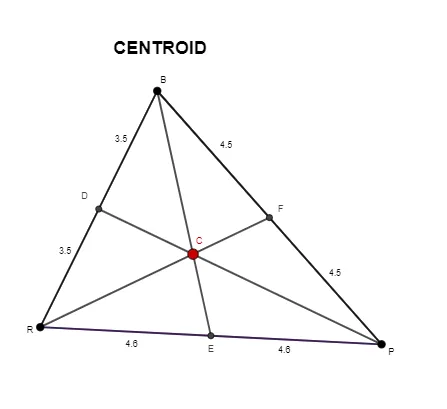
This GeoGebra example demonstrates how to construct the centroid (barycenter) of a triangle. It shows the intersection point of the three medians, illustrating the key mathematical property: the centroid divides each median in a 2:1 ratio. The construction uses Segment to draw sides, Midpoint to find edge midpoints, and Intersect to locate where the medians meet. This interactive visualization is ideal for middle and high school geometry lessons, helping students verify the centroid coordinate formula and explore relationships between the centroid and other notable triangle points like the incenter, circumcenter, and orthocenter.
GeoGebra Commands & Parameters
Segment(R, B) → fSegment(B, P) → gSegment(P, R) → hMidpoint(f) → DMidpoint(h) → EMidpoint(g) → FSegment(B, E) → iSegment(D, P) → jSegment(R, F) → kIntersect(i, j) → CSegment(B, C) → lSegment(C, E) → mSegment(R, C) → nSegment(C, F) → p_{1}Segment(C, P) → qSegment(C, D) → rSegment(B, F) → sSegment(F, P) → tSegment(P, E) → aSegment(E, R) → bSegment(R, D) → cSegment(D, B) → d
AI Drawing Prompt Reference
Draw a triangle with three vertices labeled top, bottom-left, and bottom-right. Connect the vertices to form three sides. Mark the midpoint of each side. Draw three medians by connecting each vertex to the midpoint of the opposite side. The three medians intersect at a single point inside the triangle; label this point as the centroid. From the centroid, draw line segments to each vertex and to each midpoint, creating smaller segments. This illustrates that the centroid divides each median into two parts, with the segment nearer the vertex being twice as long as the segment nearer the side.
The prompt above was compiled from the original drawing commands and is for reference only.