
Trapezoid Properties Exploration
Loading the math board and drawing, please wait…
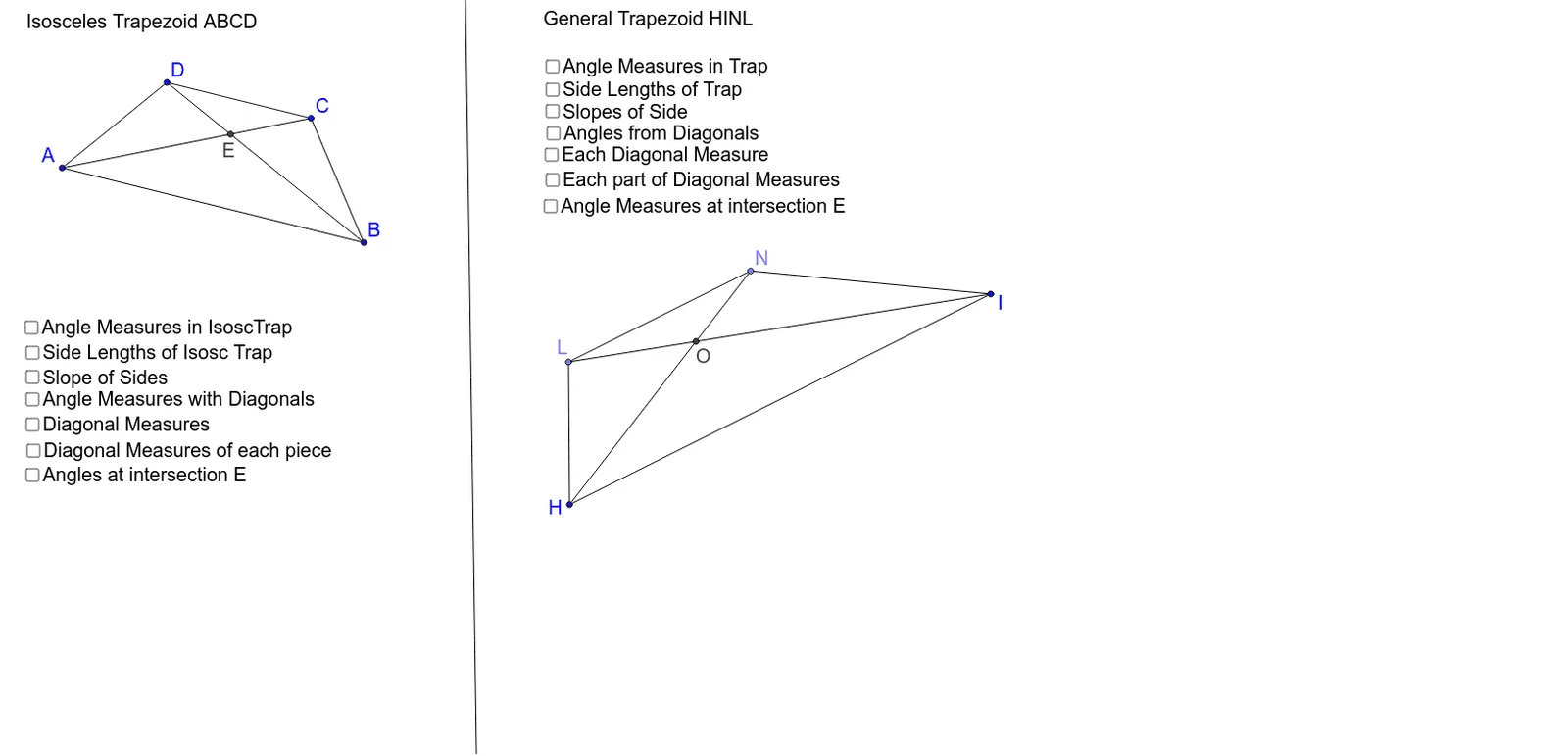
This example uses GeoGebra to explore the properties of both a general trapezoid and an isosceles trapezoid. It demonstrates key concepts such as similar triangles, angles, and distances. Commands used include Segment, LineBisector, Intersect, Mirror, Angle, Distance, Slope, Line, OrthogonalLine, Point, Circle, CircleArc. Suitable for middle school and above students or teachers.
GeoGebra Commands & Parameters
Segment(A, B) → aLineBisector(a) → bIntersect(b, a) → C_1Segment(A, D) → cMirror(D, b) → CSegment(C, B) → dSegment(C, D) → eAngle(B, A, D) → αAngle(A, D, C) → βAngle(D, C, B) → γAngle(C, B, A) → δDistance(A, D) → distanceADDistance(D, C) → distanceDD'Distance(C, B) → distanceD'BDistance(B, A) → distanceBASlope(e) → mSlope(a) → m_1Segment(A, C) → iSegment(B, D) → jIntersect(i, j) → EAngle(E, A, D) → εAngle(A, D, E) → ζAngle(E, D, C) → ηAngle(D, C, E) → θAngle(E, C, B) → ιAngle(C, B, E) → κAngle(E, B, A) → λAngle(B, A, E) → μDistance(A, E) → distanceAEDistance(E, C) → distanceED'Distance(B, E) → distanceBEDistance(E, D) → distanceEDDistance(A, C) → distanceAD'Distance(D, B) → distanceDBLine(F, G) → pLine(H, I) → qOrthogonalLine(H, q) → rOrthogonalLine(I, q) → sPoint(q) → JCircle(H, J) → tIntersect(t, r, 2) → KCircleArc(H, J, K) → c_1Point(c_1) → LLine(L, q) → a_1Intersect(a_1, s) → MSegment(L, M) → b_1Point(b_1) → NSegment(H, L) → d_1Segment(L, N) → e_1Segment(N, I) → f_1Segment(H, I) → g_1Angle(N, I, H) → νAngle(I, H, L) → ξAngle(H, L, N) → οAngle(L, N, I) → ρDistance(H, L) → distanceHLDistance(L, N) → distanceLNDistance(N, I) → distanceNIDistance(I, H) → distanceIHSlope(e_1) → m_2Slope(g_1) → m_3Segment(L, I) → h_1Segment(N, H) → i_1Intersect(h_1, i_1) → OAngle(C, E, D) → σAngle(B, E, C) → τAngle(H, L, O) → υAngle(O, L, N) → ϕAngle(L, N, O) → χAngle(N, I, O) → ψAngle(O, N, I) → ωAngle(O, I, H) → α_1Angle(I, H, O) → β_1Angle(O, H, L) → γ_1Distance(L, O) → distanceLODistance(O, N) → distanceONDistance(O, I) → distanceOIDistance(O, H) → distanceOHDistance(L, I) → distanceLIDistance(N, H) → distanceNHAngle(L, O, H) → δ_1Angle(N, O, L) → ε_1
AI Drawing Prompt Reference
Draw a trapezoid and explore its properties. Start by creating two parallel sides of the trapezoid. Then, find the perpendicular bisector of one side and use it to locate the opposite vertex. Calculate and label the measures of all interior angles and the distances between vertices and sides. Finally, draw the heights of the trapezoid and illustrate the properties of similar triangles.
The prompt above was compiled from the original drawing commands and is for reference only.