
Trapezoid Project
Loading the math board and drawing, please wait…
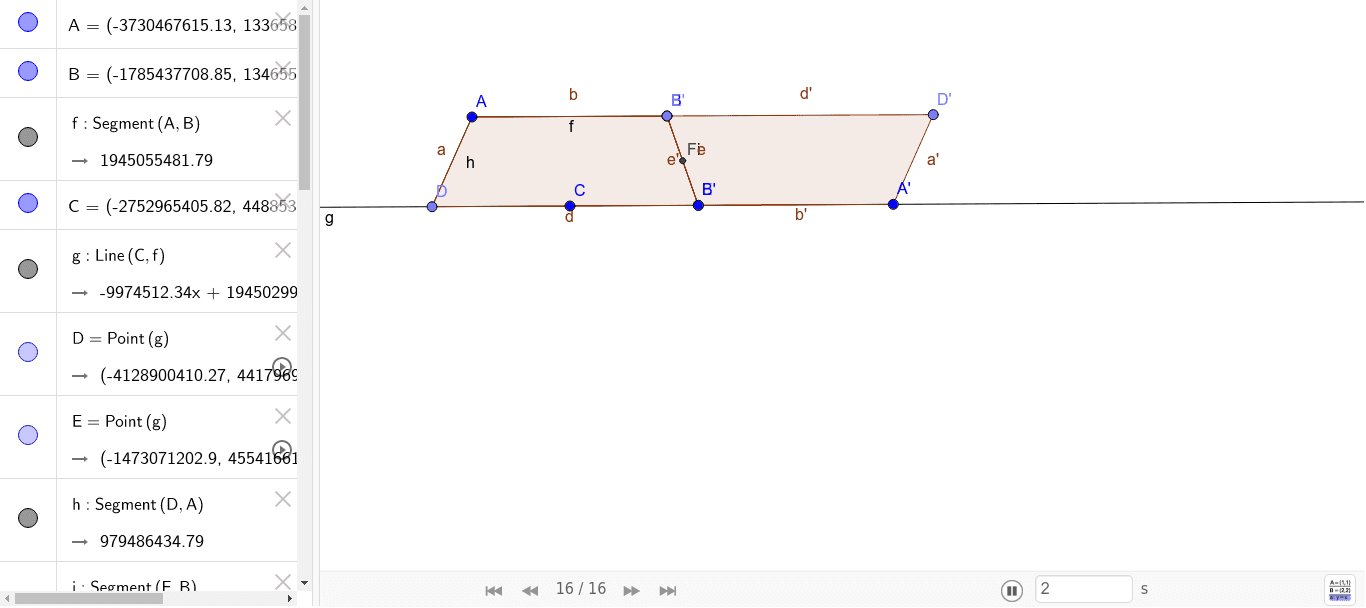
This example demonstrates the properties of a trapezoid, including angles, hyperbolas, and dilation. Key math concepts involve trapezoid definitions, angle measurement, hyperbola equations, similarity transformations (scaling), arithmetic mean, and bar graphing. Construction uses commands like Segment, Line, Point, Midpoint, Polygon, Rotate to build the trapezoid and auxiliary shapes, showing similarity through rotation and scaling, and plotting hyperbolas and bar charts. Suitable for high school mathematics teaching, illustrating geometric transformations, coordinate geometry, and data analysis visually.
GeoGebra Commands & Parameters
Segment(A, B) → fLine(C, f) → gPoint(g) → DPoint(g) → ESegment(D, A) → hSegment(E, B) → iMidpoint(i) → FPolygon(A, D, E, B) → poly1, a, d, e, bRotate(A, 180°, F) → A'Rotate(D, 180°, F) → D'Rotate(E, 180°, F) → E'Rotate(B, 180°, F) → B'Polygon(A', D', E', B') → poly1', a', d', e', b'
AI Drawing Prompt Reference
Draw a trapezoid by first creating a base segment, then a line through one endpoint of the base. Place two points on this line and connect them to the base endpoints to form the legs. Take the midpoint of one leg, then rotate the entire trapezoid 180 degrees around this midpoint to produce a second trapezoid. The two trapezoids together form a centrally symmetric figure, illustrating rotation and similarity.
The prompt above was compiled from the original drawing commands and is for reference only.