
Trapezoid Midline Geometry Demo
Loading the math board and drawing, please wait…
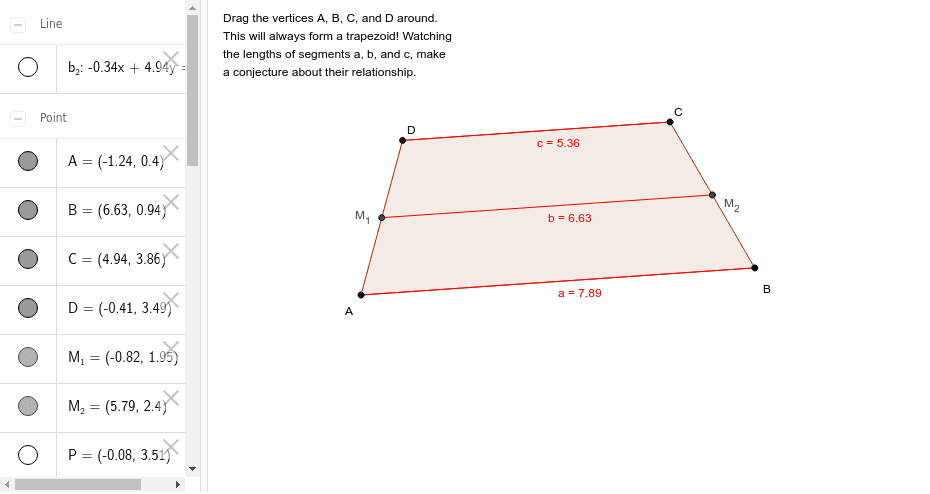
This GeoGebra example demonstrates the midline of a trapezoid, which is the segment connecting the midpoints of the two legs, parallel to the bases and equal to half the sum of the bases. Core mathematical concepts involved include trapezoids, midline theorems, parallel line properties, and geometric proofs. The construction utilizes GeoGebra commands such as Ray, Point, Line, Polygon, Segment, and Midpoint to create objects like points A, Q, a_2, B, C, b_2, P, c_2, D, forming the trapezoid polygon poly1, and marking midpoints M_1 and M_2 with text labels. It is suitable for middle school or high school geometry education, aiding students in intuitively understanding the properties of trapezoid midlines.
GeoGebra Commands & Parameters
Ray(A, Q) → a_2Point(a_2) → BLine(C, a_2) → b_2Point(b_2) → PRay(C, P) → c_2Point(c_2) → DPolygon(A, B, C, D) → poly1, a_1, b_1, c_1, dSegment(A, B) → aSegment(D, C) → cMidpoint(D, A) → M_1Midpoint(C, B) → M_2Segment(M_1, M_2) → b
AI Drawing Prompt Reference
Draw a geometry demonstration of the trapezoid midline theorem. Construct a trapezoid labeled ABCD with parallel bases AD and BC, and non-parallel legs AB and CD. Mark the midpoint M1 of leg DA and the midpoint M2 of leg CB. Connect M1 and M2 with a line segment to show the midline. The midline should be parallel to both bases and its length equals half the sum of the two bases. Label all vertices and midpoints clearly. The illustration should have a clean, educational style suitable for middle school or high school geometry instruction.
The prompt above was compiled from the original drawing commands and is for reference only.