
Trapezoid Area Dynamic Demonstration by dcp
Loading the math board and drawing, please wait…
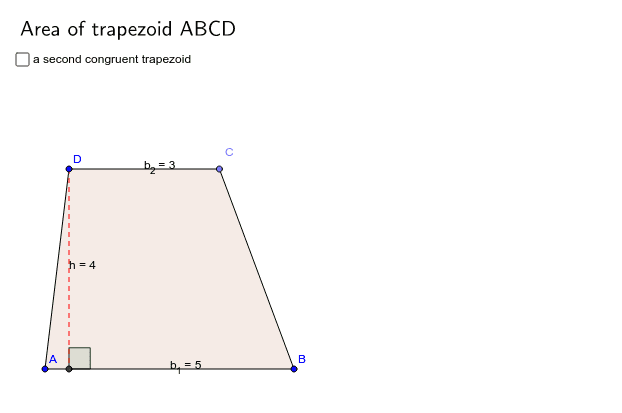
This GeoGebra example dynamically demonstrates how to calculate the area of a trapezoid. It constructs an adjustable trapezoid and uses auxiliary lines to decompose it into triangles or rectangles, thereby deriving the area formula. Core mathematical concepts include the definition of a trapezoid, the area formula (half the sum of bases times height), and geometric decomposition. Construction highlights: using Line, Point, Segment to draw the trapezoid sides, OrthogonalLine to create the height, Intersect to find key points, Polygon to form the region, Length to measure sides, Angle to mark right angles, and text objects to display the area value. This example is suitable for middle school geometry teaching, helping students understand the derivation of the trapezoid area formula, and can be used for interactive classroom demonstrations or student self-exploration.
GeoGebra Commands & Parameters
Line(A, B) → aLine(D, a) → bPoint(b) → CLength(Vector[C, D]) → b_2Length(Vector[A, B]) → b_1Segment(A, B) → ABOrthogonalLine(D, AB) → pIntersect(a, p) → ELength(Vector[D, E]) → hRay(D, C) → DC'Segment(B, C) → BCSegment(C, D) → CDSegment(D, A) → DAIntersect(Circle[C, AB], DC') → A', A'_1Segment(C, A') → CA'Ray(A, B) → AB'Intersect(Circle[B, CD], AB') → D'_1, D'Segment(A', D') → A'D'Segment(B, D') → BD'Segment(D, E) → DEAngle(B, E, D) → BEDSegment(A, E) → AEPolygon(A, B, C, D) → poly1, a_1, b_3, c, d