
Trapezium & Kite 2: Dynamic Geometry Construction and Properties
Loading the math board and drawing, please wait…
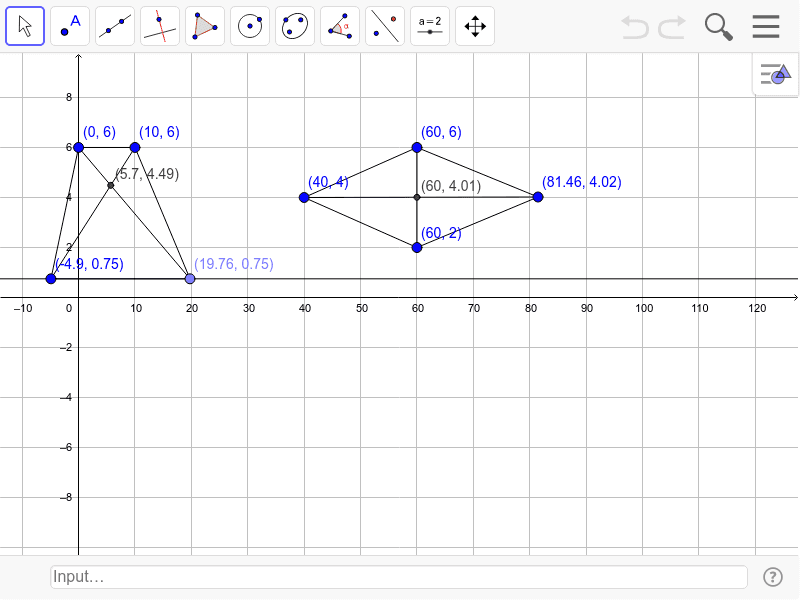
This GeoGebra example demonstrates the construction and interrelation of a trapezium (trapezoid) and a kite, two special quadrilaterals, within an interactive dynamic geometry environment. It visually explores their defining features: parallel sides for the trapezium and two pairs of adjacent equal sides for the kite, along with diagonal and symmetry properties. Core mathematical concepts include quadrilateral classification, parallel line properties, symmetry, and basic geometric construction techniques. The construction uses GeoGebra commands such as Segment, Line, Point, and Intersect, creating points A, B, C, D, E, F, G, H, M and segments/lines a through m to form the combined figure. This resource is suitable for middle school geometry lessons, helping students grasp definitions, properties, and step-by-step construction of special quadrilaterals, while fostering logical reasoning and spatial visualization skills.
GeoGebra Commands & Parameters
Segment(A, B) → aLine(C, a) → bPoint(b) → DSegment(A, C) → cSegment(B, D) → dSegment(C, D) → eSegment(A, D) → fSegment(B, C) → gSegment(E, F) → hSegment(G, F) → iSegment(G, E) → jSegment(E, H) → kSegment(H, F) → lSegment(G, H) → mIntersect(h, m) → MIntersect(f, g) → I
AI Drawing Prompt Reference
Draw a dynamic geometric figure showing the construction and relationship between a trapezoid and a kite. Include four parallel line segments forming the trapezoid, its diagonals, and two pairs of adjacent equal line segments for the kite. Mark the intersection points of the parallel segments and the diagonals, showing the trapezoid's diagonals and the kite's diagonals intersecting dynamically.
The prompt above was compiled from the original drawing commands and is for reference only.