
Translation with Sliders: Dynamic Vector-Based Geometric Transformation
Loading the math board and drawing, please wait…
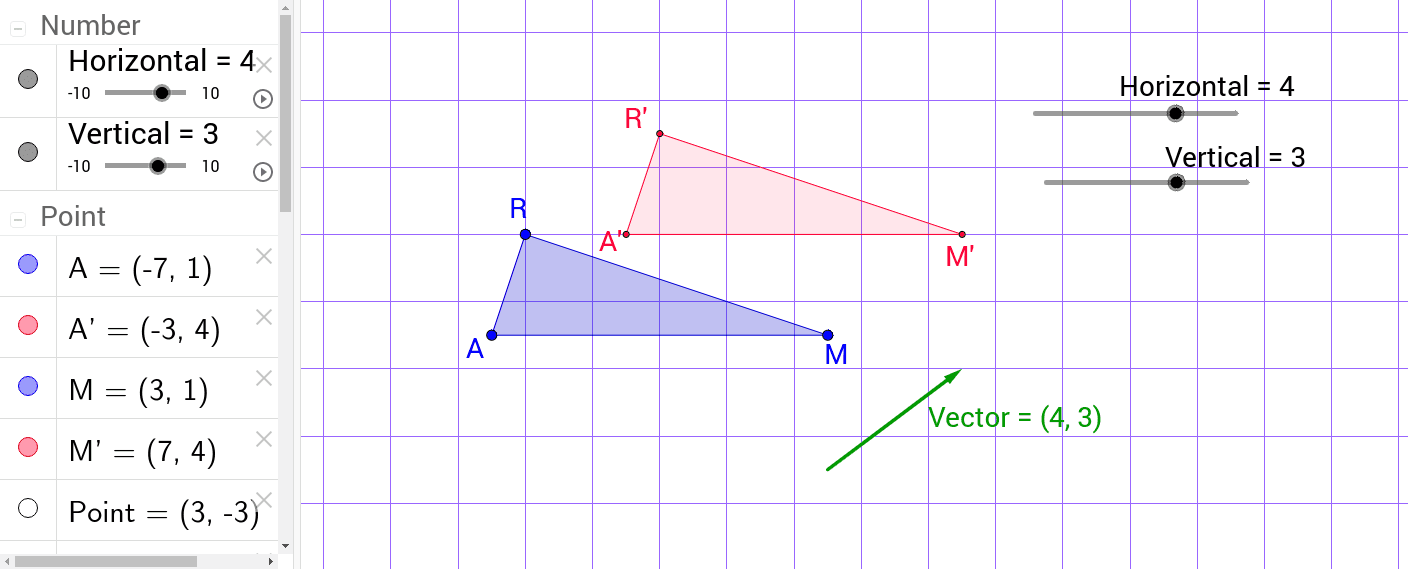
This GeoGebra example demonstrates the translation of geometric figures (polygons, circles, line segments) using interactive sliders to control the translation vector. The core mathematical concept is vector translation: every point of a figure moves by the same vector, preserving shape and size. Construction highlights: the initial polygon poly1 is created with the Polygon command; a translation vector is defined using the Vector command; horizontal and vertical sliders adjust the vector's components; key points (R, A, M) are marked with Point, and their translated counterparts (R', A', M') are generated via Translated_Point; the translated polygon poly2 and circle c_1 are then constructed. This resource is ideal for middle and high school students learning geometric transformations, as well as for teachers demonstrating the relationship between vectors and coordinate shifts in a dynamic, visual way.
GeoGebra Commands & Parameters
Polygon(R, A, M) → poly1, c, a, bVector(Point, Translated_Point) → VectorPolygon(R', A', M') → poly2, d, b_1, c_1
AI Drawing Prompt Reference
Create a dynamic geometric transformation diagram: start with a triangle defined by three vertices, and label each vertex. From one vertex, draw an arrow representing a translation vector, with its horizontal and vertical components controlled by two sliders. Then, translate each original vertex by this vector to obtain new corresponding vertices, and connect these new vertices with dashed lines or a different color to form the translated triangle. Additionally, include a circle whose center moves according to the translation vector, to illustrate the effect on curves. The overall scene should clearly show the original shape, the translation vector, slider controls, and the translated shape, emphasizing that size and shape remain unchanged.
The prompt above was compiled from the original drawing commands and is for reference only.