
Translation Transformation Practice
Loading the math board and drawing, please wait…
In collections
Translations Extra Credit #'s 1-4
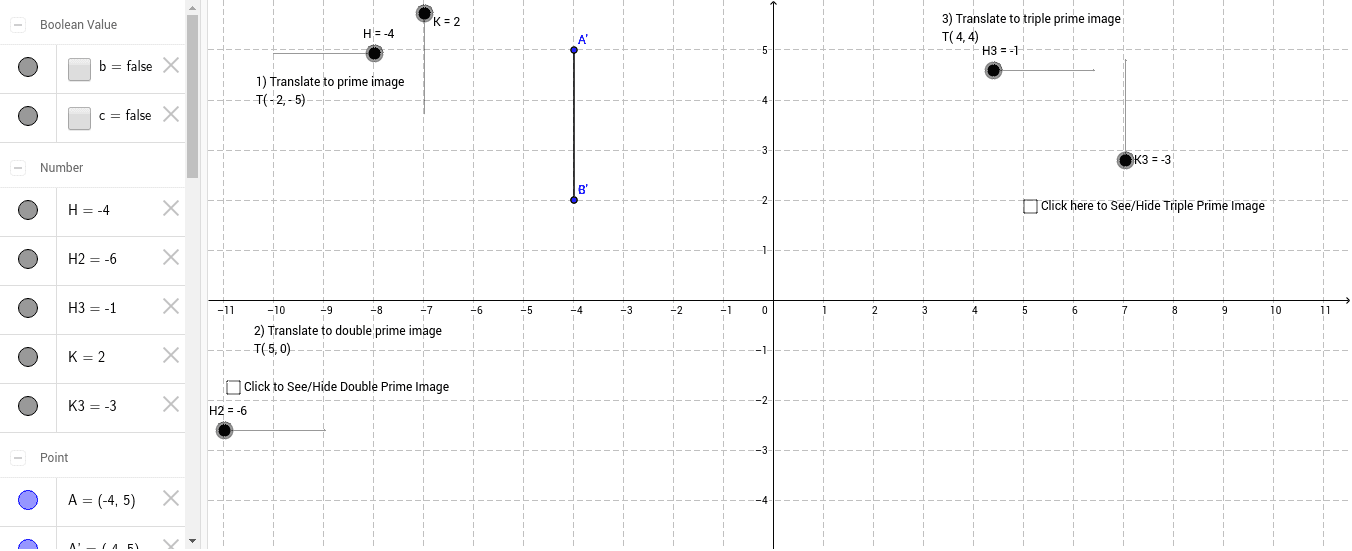
This example demonstrates the process of manipulating shapes using translation transformations, moving points, line segments, and figures through vectors; Core math concepts include vectors, translation, coordinate geometry, conditional probability, and polynomial functions; Construction highlights: commands/objects used from the GeoGebra summary: Segment, Vector, Translate; Suitable for high school geometry transformation, vector application, and introductory coordinate geometry teaching.
GeoGebra Commands & Parameters
Segment(A, B) → aVector(B, C) → uTranslate(A, u) → A'Translate(B, u) → B'Segment(A', B') → a'Vector(C, D) → vTranslate(A', v) → A''Translate(B', v) → B''Segment(A'', B'') → a''Vector(B'', E) → wTranslate(A'', w) → A'''Translate(B'', w) → B'''Segment(A''', B''') → a'''
AI Drawing Prompt Reference
Draw a series of shapes to demonstrate the process of manipulating shapes using translation transformations. Start by drawing a line segment, then create a vector based on it and use the vector to translate the endpoints of the line segment to get new points. Draw a new line segment using these new points. Repeat this process with different vectors to translate the newly formed line segments, creating a hierarchical series of shapes through translation transformations.
The prompt above was compiled from the original drawing commands and is for reference only.