
Translation (Slider)
Loading the math board and drawing, please wait…
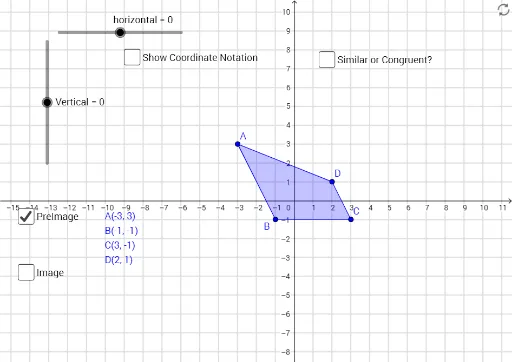
This GeoGebra example demonstrates the translation of a plane polygon controlled by sliders. The core mathematical concept is geometric transformation, specifically translation, involving vectors, coordinate changes, and congruence of shapes. Construction highlights: the Polygon command creates the original polygon poly1 with vertices A, B, C, D; sliders 'horizontal' and 'Vertical' control the shift; the translated polygon poly2 with vertices A', B', C', D' and edges a', b', c', d' is generated; text objects (text1 to text7) display coordinates or labels; auxiliary segments e, f, g, h visualize the translation vector. Suitable for middle school to high school students learning geometric transformations, and useful for teachers to demonstrate how translation preserves shape and size while moving by a given vector.
GeoGebra Commands & Parameters
Polygon(A, B, C, D) → poly1, a, b, c, dPolygon(A', B', C', D') → poly2, a', b', c', d'
AI Drawing Prompt Reference
Draw a plane polygon with vertices labeled and edges shown. Use two sliders to control the horizontal and vertical translation of the polygon. Display the original and translated polygons, ensuring the translated one is congruent to the original. Visualize the translation vector with line segments and label the vertices and key points with coordinates to observe the changes during translation.
The prompt above was compiled from the original drawing commands and is for reference only.