
Translation of 2D Shapes by a Given Translation Vector
Loading the math board and drawing, please wait…
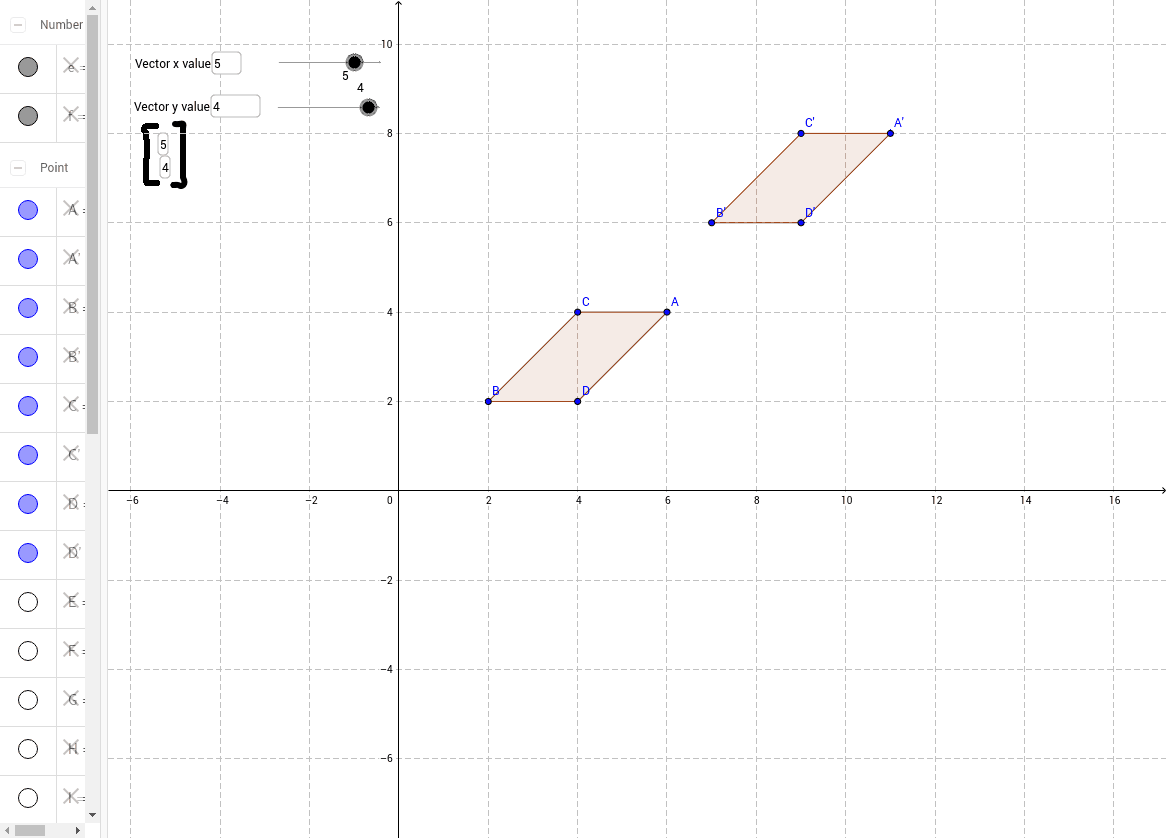
This example demonstrates how to translate 2D shapes using a given translation vector. It involves core mathematical concepts like geometric transformations, vectors, coordinate geometry, and polygons. Key GeoGebra commands used include Polygon, Textfield, Intersect, Vector, and Translate. Suitable for high school mathematics teaching on geometric transformations, vector applications, and introductory coordinate geometry.
GeoGebra Commands & Parameters
Polygon(B, C, A, D) → poly1, b, c, a, dTextfield(f) → inputBox2Intersect(xAxis, yAxis) → KVector(K, E) → uTranslate(B, u) → B'Translate(C, u) → C'Translate(A, u) → A'Translate(D, u) → D'Polygon(B', C', A', D') → poly1', b', c', a', d'Textfield(f) → inputBox4Textfield(e) → inputBox1Textfield(e) → inputBox3
AI Drawing Prompt Reference
Draw a square formed by four points. First, mark points A, B, C, and D on the coordinate plane. Then, find the intersection point K of the x-axis and y-axis. Next, draw a vector u from K to E. After that, translate points A, B, C, and D by vector u to get A', B', C', and D'. Finally, connect these new points to form a larger square.
The prompt above was compiled from the original drawing commands and is for reference only.