
Translation Demonstration by Laurie Mallis
Loading the math board and drawing, please wait…
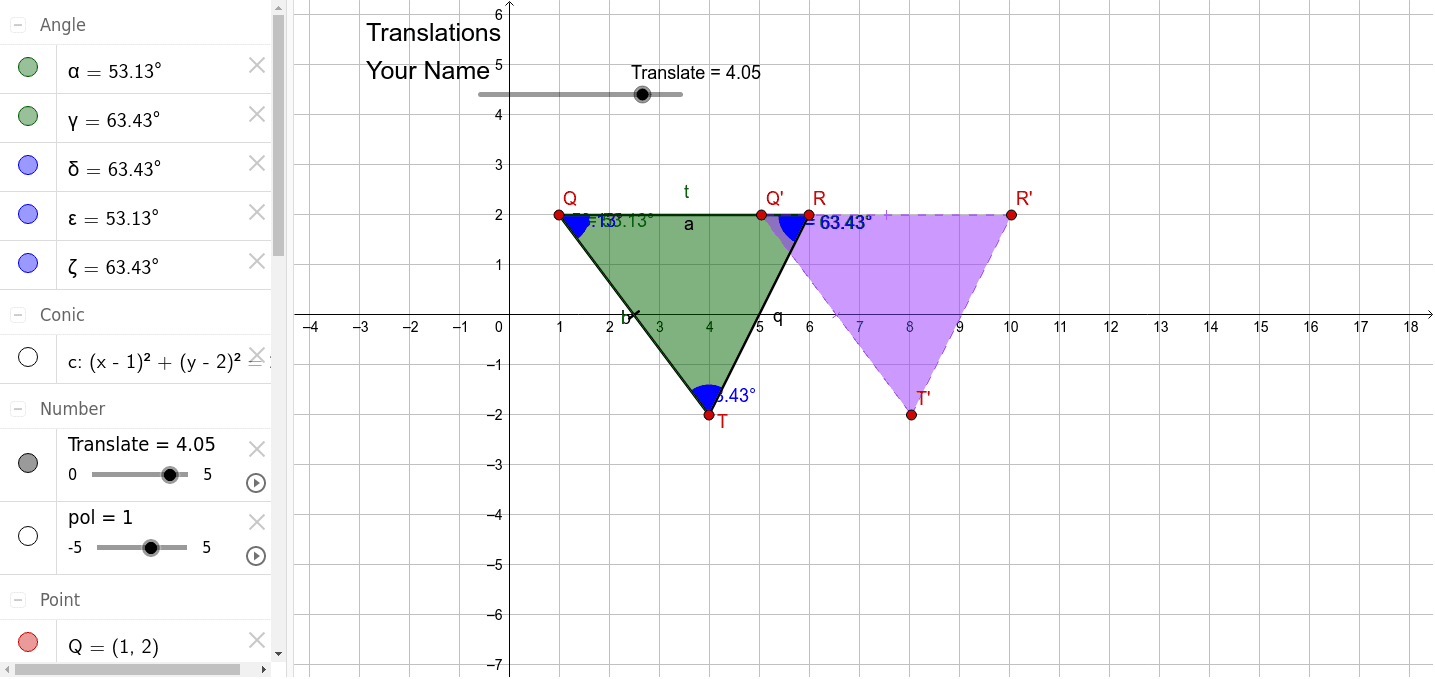
This example demonstrates the process and properties of translating shapes (like triangles, polygons) in a plane through translation transformations. Core math concepts include translation, vectors, geometric construction, and coordinate geometry. It uses commands/objects like Segment, Circle, Point, Polygon, Angle, Vector, and Translate in GeoGebra. Suitable for high school students learning geometric transformations, vectors, and coordinate geometry.
GeoGebra Commands & Parameters
Segment(Q, R) → aCircle(Q, R) → cPoint(c) → TSegment(Q, T) → bPolygon(R, Q, T) → poly1, t, r, qAngle(T, Q, R) → αAngle(Q, R, T) → γAngle(poly1) → δ, ε, ζVector(Q, Q + (1, 0)) → uTranslate(R, Vector[(u * Translate)]) → R'Translate(Q, Vector[(u * Translate)]) → Q'Translate(T, Vector[(u * Translate)]) → T'Polygon(R', Q', T') → poly1', t', r', q'
AI Drawing Prompt Reference
Draw a triangle with vertices labeled R, Q, and T. Start by constructing a circle centered at Q with radius QR, then place point T on the circle and connect Q to T, forming triangle RQT. Mark the interior angles of the triangle. Show a horizontal vector starting from Q pointing to the right. Translate the entire triangle along this vector to create a new triangle with corresponding vertices R', Q', and T'. Use dashed lines or different colors to distinguish the original triangle from the translated one, and keep the original triangle and the translation vector visible to illustrate the translation process.
The prompt above was compiled from the original drawing commands and is for reference only.