
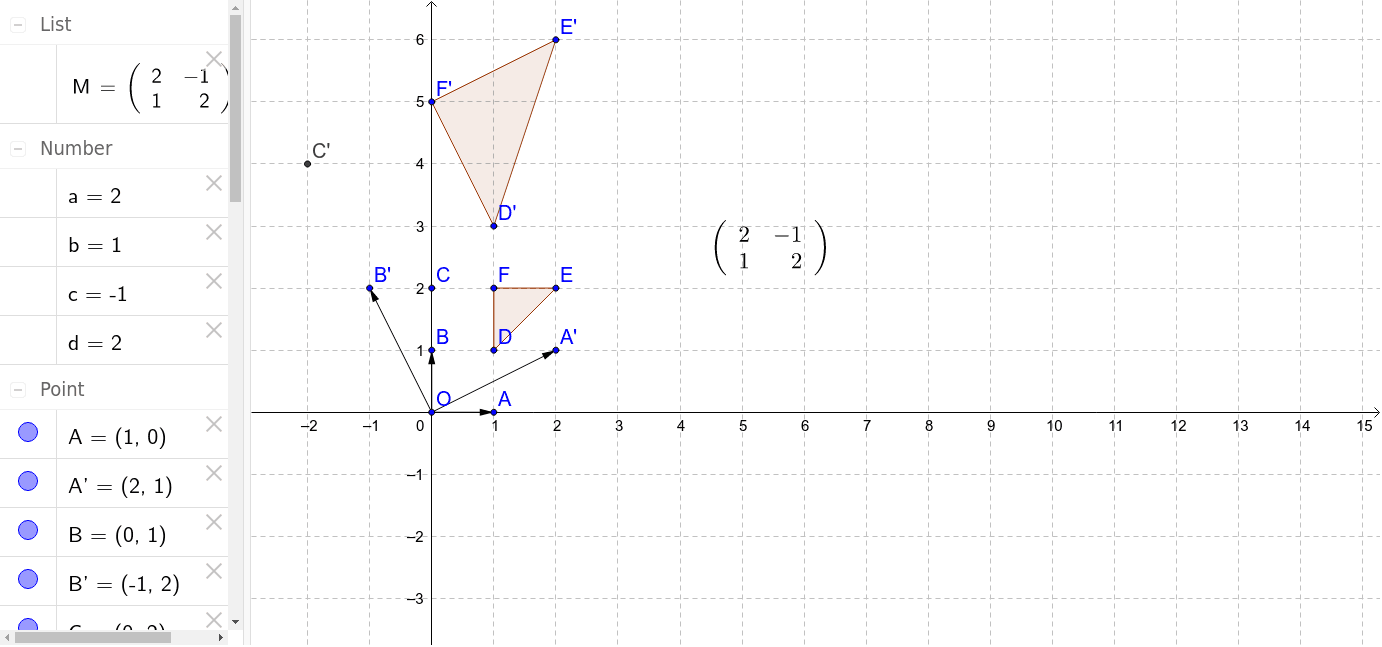
Transformation matrix based on images of (1,0) and (0,1)
Loading the math board and drawing, please wait…
This example demonstrates how to move points A' and B' to vary the transformation matrix, illustrating linear transformations and matrix applications. Key math concepts include matrix transformations, linear algebra, and vector spaces. GeoGebra commands used are Vector, Polygon, and ApplyMatrix. Suitable for high school and university students learning linear transformations and matrix applications.
GeoGebra Commands & Parameters
Vector(O, A) → uVector(O, B) → vVector(O, A') → wVector(O, B') → ePolygon(D, E, F) → poly1, f, d_1, e_1ApplyMatrix(M, D) → D'ApplyMatrix(M, E) → E'ApplyMatrix(M, F) → F'Polygon(D', E', F') → poly1', f', d', e'
AI Drawing Prompt Reference
Draw a graphic to demonstrate the application of linear transformation matrices. Start by plotting two vectors representing the unit vectors (1,0) and (0,1), then plot their transformed images and connect these transformed points with a polygon. Next, apply a transformation matrix to these points and draw the resulting polygon to show how the matrix alters the shape and position of the original figure. The entire graphic should clearly illustrate the effect of linear transformations and the role of matrices.
The prompt above was compiled from the original drawing commands and is for reference only.