
TR KAY - Geometric Visualization of Equivalent Fractions
Loading the math board and drawing, please wait…
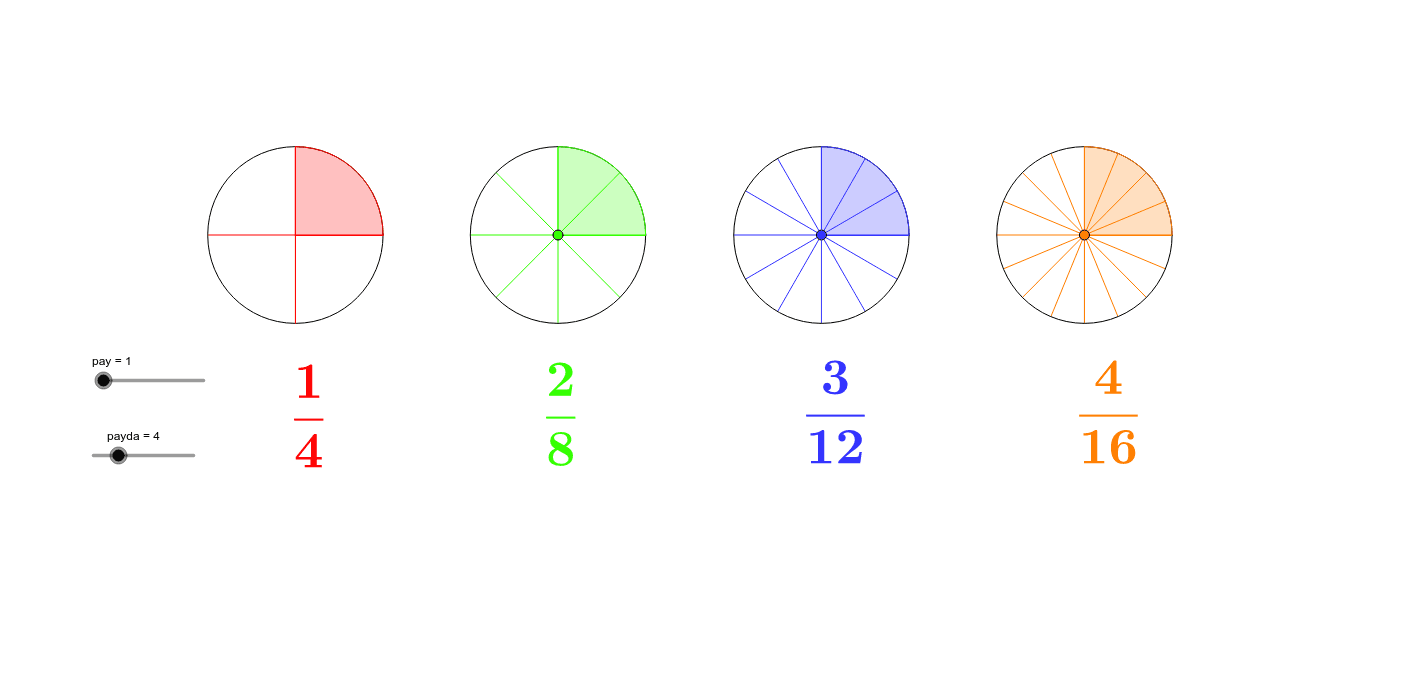
This GeoGebra example demonstrates the geometric concept of equivalent fractions. It involves core mathematical ideas such as fraction equivalence and circular sector division. Construction utilizes commands like Circle, Sequence, Point, Rotate, Intersect, and CircleSector to create dynamic visual models. The interactive diagram helps visualize how different fractions represent the same portion of a whole. Suitable for middle school mathematics education and conceptual understanding of rational numbers.
GeoGebra Commands & Parameters
Circle((0, 0), 1) → cSequence(Rotate[A, (i * 360 / payda)°], i, 1, payda) → liste1Point(xAxis) → CCircle(C, 1) → gPoint(xAxis) → DCircle(D, 1) → hPoint(xAxis) → ECircle(E, 1) → kPoint(g) → FPoint(h) → GPoint(k) → HRotate(A, (360 * pay / payda)°) → A'Rotate(F, (360 * pay / payda)°, C) → F'Rotate(G, (360 * pay / payda)°, D) → G'Rotate(H, (360 * pay / payda)°, E) → H'Intersect(xAxis, yAxis) → BCircleSector(B, A, A') → dCircleSector(C, F, F') → pCircleSector(D, G, G') → qCircleSector(E, H, H') → rSequence(Rotate[F, (i * 360 / (2 * payda))°, C], i, 1, 2 * payda) → liste4Sequence(Rotate[G, (i * 360 / (3 * payda))°, D], i, 1, 3 * payda) → liste5Sequence(Rotate[H, (i * 360 / (4 * payda))°, E], i, 1, 4 * payda) → liste6Sequence(Segment[(0, 0), Element[liste1, i]], i, 1, payda) → liste3Sequence(Segment[C, Element[liste4, i]], i, 1, 2 * payda) → liste2Sequence(Segment[D, Element[liste5, i]], i, 1, 3 * payda) → liste7Sequence(Segment[E, Element[liste6, i]], i, 1, 4 * payda) → liste8
AI Drawing Prompt Reference
Draw a unit circle and then rotate several equal sector arcs around the center to represent equivalent fractions with different denominators. Start by drawing a unit circle, then create multiple equal sector arcs, each representing a fraction, by rotating them evenly around the circle. Finally, connect the center to the endpoints of these arcs with line segments to illustrate the equivalent relationships between different fractions.
The prompt above was compiled from the original drawing commands and is for reference only.