
Total Surface Area of a Cuboid
Loading the math board and drawing, please wait…
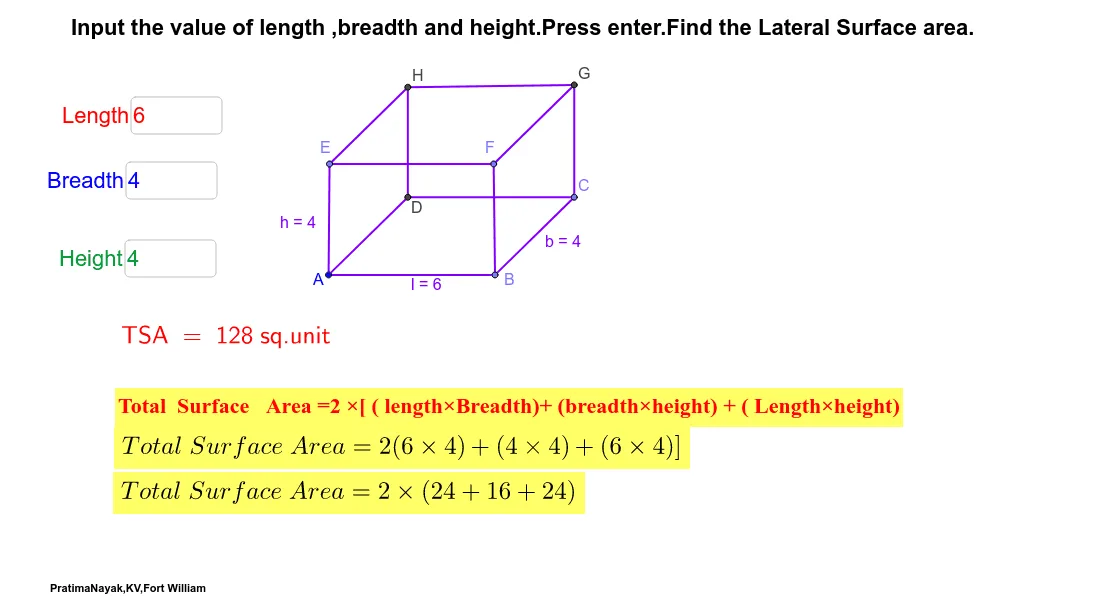
This example can be used as a worksheet for teachers and students. It demonstrates the calculation of the total surface area of a cuboid. Key mathematical concepts include area and solid geometry. Using GeoGebra commands such as TextField, Point, Segment, Line, etc., the dimensions of the cuboid can be dynamically adjusted to calculate its total surface area. Suitable for students from middle school and above.
GeoGebra Commands & Parameters
Textfield(l_1) → inputBox1Textfield(b_2) → inputBox2Textfield(h_1) → inputBox3Textfield(l_1) → inputBox1_1Textfield(b_2) → inputBox2_1Textfield(h_1) → inputBox3_1Textfield(l_1) → inputBox1_2Textfield(b_2) → inputBox2_2Textfield(h_1) → inputBox3_2Textfield(l_1) → inputBox1_3Textfield(b_2) → inputBox2_3Textfield(h_1) → inputBox3_3Point(Circle[A, abs(l_1)]) → BSegment(A, B) → lPoint(Circle[B, abs(b_2)]) → CSegment(B, C) → bLine(C, l) → dLine(A, b) → eIntersect(e, d) → DSegment(D, C) → fSegment(D, A) → gOrthogonalLine(A, l) → iOrthogonalLine(B, l) → jOrthogonalLine(D, f) → kOrthogonalLine(C, f) → mPoint(Circle[A, abs(h_1)]) → ESegment(A, E) → hPoint(Circle[B, abs(h_1)]) → FSegment(B, F) → pLine(E, g) → qLine(E, l) → rLine(F, b) → sIntersect(m, s) → GIntersect(q, k) → HSegment(H, G) → tSegment(F, G) → a_1Segment(E, H) → b_1Segment(C, G) → c_1Segment(H, D) → d_1Segment(E, F) → e_1Textfield(l_1) → inputBox1_4Textfield(b_2) → inputBox2_4Textfield(h_1) → inputBox3_4Textfield(l_1) → inputBox1_5Textfield(b_2) → inputBox2_5Textfield(h_1) → inputBox3_5Textfield(l_1) → inputBox1_6Textfield(b_2) → inputBox2_6Textfield(h_1) → inputBox3_6Textfield(l_1) → inputBox1_7Textfield(b_2) → inputBox2_7Textfield(h_1) → inputBox3_7Point(Circle[A_1, abs(l_1)]) → B_1Segment(A_1, B_1) → l_2Point(Circle[B_1, abs(b_2)]) → C_1Segment(B_1, C_1) → b_3Line(C_1, l_2) → d_2Line(A_1, b_3) → e_2OrthogonalLine(A_1, l_2) → i_1OrthogonalLine(B_1, l_2) → j_1Point(Circle[A_1, abs(h_1)]) → E_1Segment(A_1, E_1) → h_2Line(E_1, l_2) → r_1Textfield(l_1) → inputBox1_8Textfield(b_2) → inputBox2_8Textfield(h_1) → inputBox3_8Textfield(l_1) → inputBox1_9Textfield(b_2) → inputBox2_9Textfield(h_1) → inputBox3_9Textfield(l_1) → inputBox1_{10}Textfield(b_2) → inputBox2_{10}Textfield(h_1) → inputBox3_{10}Textfield(l_1) → inputBox1_{11}Textfield(b_2) → inputBox2_{11}Textfield(h_1) → inputBox3_{11}Point(Circle[A_2, abs(l_1)]) → B_2Segment(A_2, B_2) → l_3Point(Circle[B_2, abs(b_2)]) → C_2Segment(B_2, C_2) → b_4Line(C_2, l_3) → d_3Line(A_2, b_4) → e_3OrthogonalLine(A_2, l_3) → i_2OrthogonalLine(B_2, l_3) → j_2Point(Circle[A_2, abs(h_1)]) → E_2Segment(A_2, E_2) → h_3Line(E_2, l_3) → r_2Textfield(l_1) → inputBox1_{12}Textfield(b_2) → inputBox2_{12}Textfield(h_1) → inputBox3_{12}Textfield(l_1) → inputBox1_{13}Textfield(b_2) → inputBox2_{13}Textfield(h_1) → inputBox3_{13}Textfield(l_1) → inputBox1_{14}Textfield(b_2) → inputBox2_{14}Textfield(h_1) → inputBox3_{14}Textfield(l_1) → inputBox1_{15}Textfield(b_2) → inputBox2_{15}Textfield(h_1) → inputBox3_{15}Textfield(l_1) → inputBox1_{16}Textfield(b_2) → inputBox2_{16}Textfield(h_1) → inputBox3_{16}Textfield(l_1) → inputBox1_{17}Textfield(b_2) → inputBox2_{17}Textfield(h_1) → inputBox3_{17}Textfield(l_1) → inputBox1_{18}Textfield(b_2) → inputBox2_{18}Textfield(h_1) → inputBox3_{18}Textfield(l_1) → inputBox1_{19}Textfield(b_2) → inputBox2_{19}Textfield(h_1) → inputBox3_{19}Point(Circle[A_3, abs(l_1)]) → B_3Segment(A_3, B_3) → l_4Point(Circle[B_3, abs(b_2)]) → C_3Segment(B_3, C_3) → b_5Line(C_3, l_4) → d_4Line(A_3, b_5) → e_4OrthogonalLine(A_3, l_4) → i_3OrthogonalLine(B_3, l_4) → j_3Point(Circle[A_3, abs(h_1)]) → E_3Segment(A_3, E_3) → h_4Line(E_3, l_4) → r_3Textfield(l_1) → inputBox1_{20}Textfield(b_2) → inputBox2_{20}Textfield(h_1) → inputBox3_{20}Textfield(l_1) → inputBox1_{21}Textfield(b_2) → inputBox2_{21}Textfield(h_1) → inputBox3_{21}Textfield(l_1) → inputBox1_{22}Textfield(b_2) → inputBox2_{22}Textfield(h_1) → inputBox3_{22}Textfield(l_1) → inputBox1_{23}Textfield(b_2) → inputBox2_{23}Textfield(h_1) → inputBox3_{23}Textfield(l_1) → inputBox1_{24}Textfield(b_2) → inputBox2_{24}Textfield(h_1) → inputBox3_{24}Textfield(l_1) → inputBox1_{25}Textfield(b_2) → inputBox2_{25}Textfield(h_1) → inputBox3_{25}Textfield(l_1) → inputBox1_{26}Textfield(b_2) → inputBox2_{26}Textfield(h_1) → inputBox3_{26}Textfield(l_1) → inputBox1_{27}Textfield(b_2) → inputBox2_{27}Textfield(h_1) → inputBox3_{27}Textfield(l_1) → inputBox1_{28}Textfield(b_2) → inputBox2_{28}Textfield(h_1) → inputBox3_{28}Textfield(l_1) → inputBox1_{29}Textfield(b_2) → inputBox2_{29}Textfield(h_1) → inputBox3_{29}Textfield(l_1) → inputBox1_{30}Textfield(b_2) → inputBox2_{30}Textfield(h_1) → inputBox3_{30}Textfield(l_1) → inputBox1_{31}Textfield(b_2) → inputBox2_{31}Textfield(h_1) → inputBox3_{31}
AI Drawing Prompt Reference
Draw a cuboid with input boxes for its length, width, and height, which dynamically adjusts the cuboid's size based on the inputs. Clearly show all six faces of the cuboid and label the length, width, and height. Calculate and display the total surface area of the cuboid, ensuring it matches the actual surface area. Finally, use auxiliary line segments and points to demonstrate the area calculation for each face, helping viewers understand how the total surface area is computed.
The prompt above was compiled from the original drawing commands and is for reference only.