
Total Area Calculation
Loading the math board and drawing, please wait…
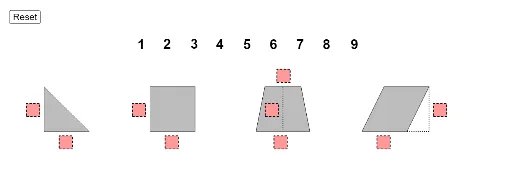
This example demonstrates calculating the total area of a parallelogram, trapezoid, rectangle, and triangle. Key mathematical concepts include area calculation, polygons, and straight lines. Using GeoGebra commands such as Point, Polygon, If, Segment, Sequence, etc., the example allows dynamic adjustment of parameters to observe area changes. Suitable for middle school and above students to learn area calculation and optimization problems.
GeoGebra Commands & Parameters
Point({36, 0}) → parStarterPoint({24, 0}) → trapStarterPoint({12, 0}) → rectStarterPolygon((triLength / 3, -2), (triLength / 3 + 1.5, -2), 4) → poly1Polygon(rectStarter + (rectLength / 3, -2), rectStarter + (rectLength / 3 + 1.5, -2), 4) → poly3Polygon((-2, triHeight / 3), (-0.5, triHeight / 3), 4) → poly2Polygon(trapStarter + (trapB1 / 3, -2), trapStarter + (trapB1 / 3 + 1.5, -2), 4) → poly5Polygon(trapStarter + (trapB2 / 3 + (trapB1 - trapB2) / 2, trapHeight + 0.5), trapStarter + (trapB2 / 3 + (trapB1 - trapB2) / 2 + 1.5, trapHeight + 0.5), 4) → poly6Polygon(parStarter + (parLength / 3, -2), parStarter + (parLength / 3 + 1.5, -2), 4) → poly8Polygon(parStarter + (parLength + 3, parHeight / 3), parStarter + (parLength + 4.5, parHeight / 3), 4) → poly9Polygon(rectStarter + (-2, rectHeight / 3), rectStarter + (-0.5, rectHeight / 3), 4) → poly4Polygon(trapStarter + (trapB1 / 2 - 2, trapHeight / 3), trapStarter + (trapB1 / 2 - 0.5, trapHeight / 3), 4) → poly7If(IsInRegion[A, poly9], 1, If[IsInRegion[B, poly9], 2, If[IsInRegion[C, poly9], 3, If[IsInRegion[D, poly9], 4, If[IsInRegion[E, poly9], 5, If[IsInRegion[F, poly9], 6, If[IsInRegion[G, poly9], 7, If[IsInRegion[H, poly9], 8, If[IsInRegion[I, poly9], 9, 0]]]]]]]]) → nineSumIf(IsInRegion[A, poly8], 1, If[IsInRegion[B, poly8], 2, If[IsInRegion[C, poly8], 3, If[IsInRegion[D, poly8], 4, If[IsInRegion[E, poly8], 5, If[IsInRegion[F, poly8], 6, If[IsInRegion[G, poly8], 7, If[IsInRegion[H, poly8], 8, If[IsInRegion[I, poly8], 9, 0]]]]]]]]) → eightSumIf(IsInRegion[A, poly6], 1, If[IsInRegion[B, poly6], 2, If[IsInRegion[C, poly6], 3, If[IsInRegion[D, poly6], 4, If[IsInRegion[E, poly6], 5, If[IsInRegion[F, poly6], 6, If[IsInRegion[G, poly6], 7, If[IsInRegion[H, poly6], 8, If[IsInRegion[I, poly6], 9, 0]]]]]]]]) → sixSumIf(IsInRegion[A, poly5], 1, If[IsInRegion[B, poly5], 2, If[IsInRegion[C, poly5], 3, If[IsInRegion[D, poly5], 4, If[IsInRegion[E, poly5], 5, If[IsInRegion[F, poly5], 6, If[IsInRegion[G, poly5], 7, If[IsInRegion[H, poly5], 8, If[IsInRegion[I, poly5], 9, 0]]]]]]]]) → fiveSumIf(IsInRegion[A, poly3], 1, If[IsInRegion[B, poly3], 2, If[IsInRegion[C, poly3], 3, If[IsInRegion[D, poly3], 4, If[IsInRegion[E, poly3], 5, If[IsInRegion[F, poly3], 6, If[IsInRegion[G, poly3], 7, If[IsInRegion[H, poly3], 8, If[IsInRegion[I, poly3], 9, 0]]]]]]]]) → threeSumIf(IsInRegion[A, poly2], 1, If[IsInRegion[B, poly2], 2, If[IsInRegion[C, poly2], 3, If[IsInRegion[D, poly2], 4, If[IsInRegion[E, poly2], 5, If[IsInRegion[F, poly2], 6, If[IsInRegion[G, poly2], 7, If[IsInRegion[H, poly2], 8, If[IsInRegion[I, poly2], 9, 0]]]]]]]]) → twoSumPoint({0, 0}) → triangleStarterPolygon(triangleStarter, triangleStarter + (triLength, 0), triangleStarter + (0, triHeight)) → triangle, f, g, hPolygon(rectStarter, rectStarter + (rectLength, 0), rectStarter + (rectLength, rectHeight), rectStarter + (0, rectHeight)) → rect, i, j, k, pIf(IsInRegion[A, poly1], 1, If[IsInRegion[B, poly1], 2, If[IsInRegion[C, poly1], 3, If[IsInRegion[D, poly1], 4, If[IsInRegion[E, poly1], 5, If[IsInRegion[F, poly1], 6, If[IsInRegion[G, poly1], 7, If[IsInRegion[H, poly1], 8, If[IsInRegion[I, poly1], 9, 0]]]]]]]]) → oneSumPolygon(trapStarter, trapStarter + (trapB1, 0), trapStarter + ((trapB1 + trapB2) / 2, trapHeight), trapStarter + ((trapB1 - trapB2) / 2, trapHeight)) → trap, q, r, s, tSegment(trapStarter + (trapB1 / 2, 0), trapStarter + (trapB1 / 2, trapHeight)) → trapHeightSegmentIf(IsInRegion[A, poly4], 1, If[IsInRegion[B, poly4], 2, If[IsInRegion[C, poly4], 3, If[IsInRegion[D, poly4], 4, If[IsInRegion[E, poly4], 5, If[IsInRegion[F, poly4], 6, If[IsInRegion[G, poly4], 7, If[IsInRegion[H, poly4], 8, If[IsInRegion[I, poly4], 9, 0]]]]]]]]) → fourSumIf(IsInRegion[A, poly7], 1, If[IsInRegion[B, poly7], 2, If[IsInRegion[C, poly7], 3, If[IsInRegion[D, poly7], 4, If[IsInRegion[E, poly7], 5, If[IsInRegion[F, poly7], 6, If[IsInRegion[G, poly7], 7, If[IsInRegion[H, poly7], 8, If[IsInRegion[I, poly7], 9, 0]]]]]]]]) → sevenSumPolygon(parStarter, parStarter + (parLength, 0), parStarter + (parLength + 2.5, parHeight), parStarter + (2.5, parHeight)) → par, parstarter, a, b, cSegment(parStarter + (parLength, 0), parStarter + (parLength + 2.5, 0)) → dSegment(parStarter + (parLength + 2.5, parHeight), parStarter + (parLength + 2.5, 0)) → eSequence(Point[{i, 10}], i, 11, 11 + 24, 3) → anchors
AI Drawing Prompt Reference
Draw a parallelogram, a trapezoid, a rectangle, and a triangle. Start by placing three points on the x-axis to serve as the starting points for each shape. Then, draw each shape, ensuring their sides are parallel or perpendicular to the x-axis. Finally, draw the height or length segments of each shape to observe area changes.
The prompt above was compiled from the original drawing commands and is for reference only.