
Time Zones and Integer Comparison
Loading the math board and drawing, please wait…
In collections
Negative Zahlen - Einführung
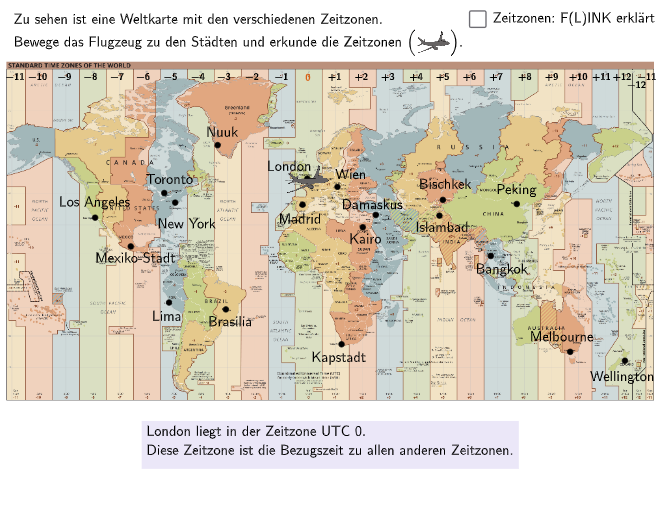
This example uses multiple-choice and open-ended questions to help students understand the concept of time zones and their relationship with integers. Key mathematical concepts include comparing and ordering integers, and their application in real-life situations. GeoGebra commands such as Sequence, Element, Textfield, Circle are used for construction. Suitable for 5-6 grade students.
GeoGebra Commands & Parameters
Sequence(Random[1, 10], i, 1, 10) → randomNumbers, {10, 10, 2, 10, 5, 7, 3, 1, 10, 6}Element(randomNumbers, Mod[questionCount, Length[randomNumbers]] + 1) → randomNumberTextfield(input) → inputBoxCircle(PBangkok, 0.6) → cBangkokCircle(PBrasilia, 0.6) → cBrasiliaCircle(PKairo, 0.25) → cKairoCircle(PKapstadt, 0.6) → cKapstadtCircle(PLima, 0.6) → cLimaCircle(PLondon, 0.4) → cLondonCircle(PLosAngeles, 0.6) → cLosAngelesCircle(PMadrid, 0.4) → cMadridCircle(PMelbourne, 0.6) → cMelbourneCircle(PNewYork, 0.2) → cNewYorkCircle(PNuuk, 0.6) → cNuukCircle(PRom, 0.2) → cRomCircle(PShanghai, 0.6) → cShanghaiCircle(PWellington, 0.6) → cWellingtonCircle(PWien, 0.2) → cWienCircle(PBischkek, 0.2) → cBischkekCircle(PIslambad, 0.2) → cIslambadCircle(PDamaskus, 0.25) → cDamaskusCircle(PMexikoStadt, 0.6) → cMexikoStadtCircle(PToronto, 0.2) → cTorontoCircle(PPeking, 0.6) → cPekingMidpoint(Corner[picFlugzeug, 1], Corner[picFlugzeug, 3]) → FlugzeugIndexOf(Flugzeug, PointList) → posText(txtTimeInfo, Midpoint[PosImg11, PosImg12] + (0, -0.25), false, true, 0, -1) → txtTimeInfo02Text("\textsf{\tiny{−7}}", Corner[picKarte, 4] + (0.275 + (0.75 * 4), -0.45), false, true, 0, 0) → txt07mText("\textsf{\tiny{−6}}", Corner[picKarte, 4] + (0.275 + (0.75 * 5), -0.45), false, true, 0, 0) → txt06mText("\textsf{\tiny{−5}}", Corner[picKarte, 4] + (0.275 + (0.76 * 6), -0.45), false, true, 0, 0) → txt05mText("\textsf{\tiny{−9}}", Corner[picKarte, 4] + (0.275 + (0.73 * 2), -0.45), false, true, 0, 0) → txt09mText("\textsf{\tiny{−8}}", Corner[picKarte, 4] + (0.275 + (0.74 * 3), -0.45), false, true, 0, 0) → txt08mText("\textsf{\tiny{−10}}", Corner[picKarte, 4] + (0.275 + 0.68, -0.45), false, true, 0, 0) → txt10mText("\textsf{\tiny{−11}}", Corner[picKarte, 4] + (0.28, -0.45), false, true, 0, 0) → txt11mText("\textsf{\tiny{−4}}", Corner[picKarte, 4] + (0.275 + (0.765 * 7), -0.45), false, true, 0, 0) → txt04mText("\textsf{\tiny{−3}}", Corner[picKarte, 4] + (0.275 + (0.765 * 8), -0.45), false, true, 0, 0) → txt03mText("\textsf{\tiny{−2}}", Corner[picKarte, 4] + (0.275 + (0.77 * 9), -0.45), false, true, 0, 0) → txt02mText("\textsf{\tiny{−1}}", Corner[picKarte, 4] + (0.275 + (0.78 * 10), -0.45), false, true, 0, 0) → txt01mText("\textsf{\tiny{0}}", Corner[picKarte, 4] + (0.275 + (0.78 * 11), -0.45), false, true, 0, 0) → txt00Text("\textsf{\tiny{+1}}", Corner[picKarte, 4] + (0.275 + (0.78 * 12), -0.45), false, true, 0, 0) → txt01Text("\textsf{\tiny{+2}}", Corner[picKarte, 4] + (0.275 + (0.78 * 13), -0.45), false, true, 0, 0) → txt02Text("\textsf{\tiny{+3}}", Corner[picKarte, 4] + (0.275 + (0.78 * 14), -0.45), false, true, 0, 0) → txt03Text("\textsf{\tiny{+4}}", Corner[picKarte, 4] + (0.275 + (0.782 * 15), -0.45), false, true, 0, 0) → txt04Text("\textsf{\tiny{+5}}", Corner[picKarte, 4] + (0.275 + (0.782 * 16), -0.45), false, true, 0, 0) → txt05Text("\textsf{\tiny{+6}}", Corner[picKarte, 4] + (0.275 + (0.782 * 17), -0.45), false, true, 0, 0) → txt06Text("\textsf{\tiny{+7}}", Corner[picKarte, 4] + (0.275 + (0.782 * 18), -0.45), false, true, 0, 0) → txt07Text("\textsf{\tiny{+8}}", Corner[picKarte, 4] + (0.275 + (0.785 * 19), -0.45), false, true, 0, 0) → txt08Text("\textsf{\tiny{+9}}", Corner[picKarte, 4] + (0.275 + (0.785 * 20), -0.45), false, true, 0, 0) → txt09Text("\textsf{\tiny{+10}}", Corner[picKarte, 4] + (0.275 + (0.785 * 21), -0.45), false, true, 0, 0) → txt10Text("\textsf{\tiny{+11}}", Corner[picKarte, 4] + (0.275 + (0.78 * 22), -0.45), false, true, 0, 0) → txt11Text("\textsf{\tiny{+12}}", Corner[picKarte, 4] + (0.275 + (0.772 * 23), -0.45), false, true, 0, 0) → txt12Text("\textsf{\tiny{−12}}", Corner[picKarte, 4] + (0.275 + (0.79 * 23), -0.7), false, true, 0, 0) → txt12mText("\textsf{\tiny{−11}}", Corner[picKarte, 4] + (0.275 + (0.77 * 24), -0.45), false, true, 0, 0) → txt11m1Length(TimeList) → LengthTimeList
AI Drawing Prompt Reference
Draw a graphic showing integer comparisons of time zones across different cities. The graphic includes circular markers representing various cities, each with a text box displaying corresponding integer time differences, such as -7, -6, etc. There is also an airplane marker indicating flight paths. The construction order is: first draw all circles, then add text boxes, and finally add the airplane marker. The graphic is suitable for 5-6 grade students to understand integer comparisons and time zone relationships.
The prompt above was compiled from the original drawing commands and is for reference only.