
The Cotangent and the Unit Circle
Loading the math board and drawing, please wait…
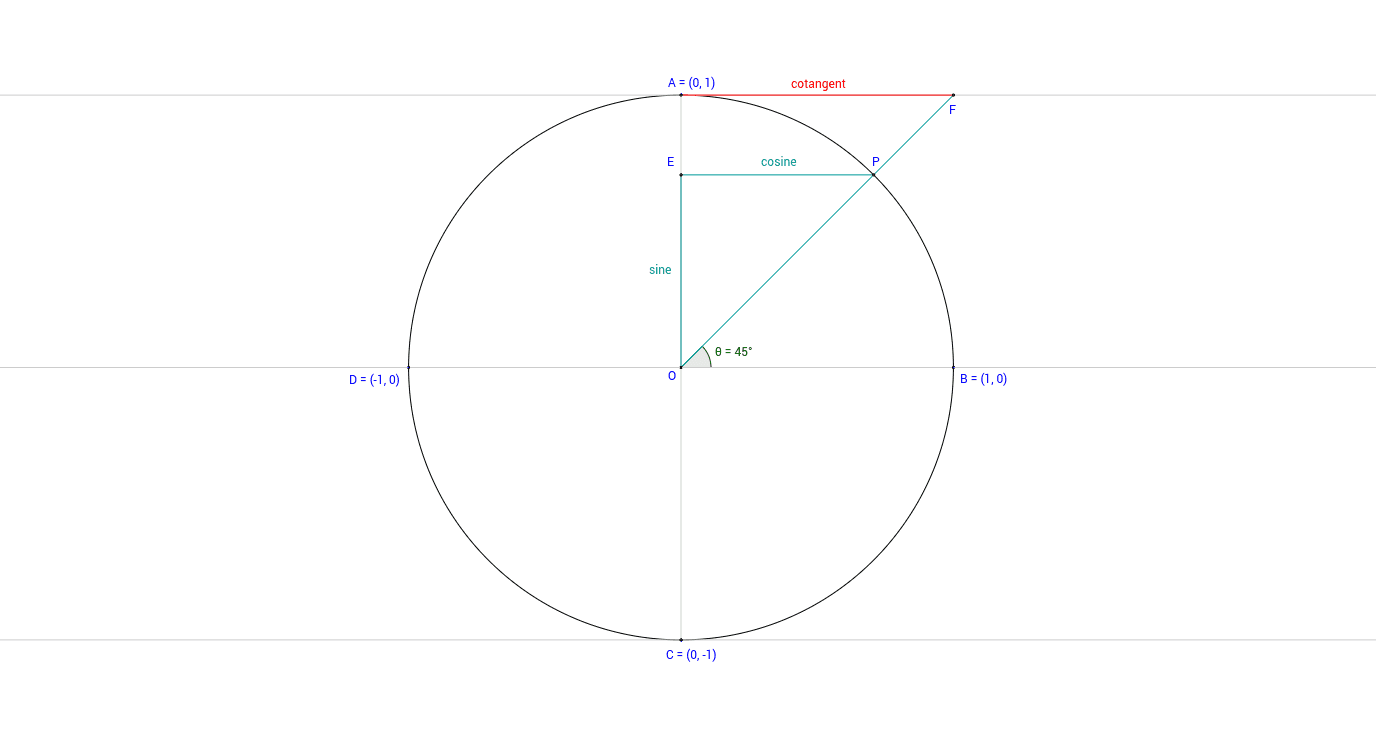
This GeoGebra applet dynamically demonstrates the geometric relationships between sine, cosine, and cotangent functions as the central angle θ varies on the unit circle. The core mathematical concepts include the unit circle definition of trigonometric functions, the geometric interpretation of the cotangent ratio (cosθ / sinθ), and the visual linkage between circular motion and trigonometric curves. Constructed using key GeoGebra commands such as Circle, Segment, Line, Angle, and Intersection, the applet defines key objects like cosine, sine, and multiple cotangent segments to map geometric lengths to algebraic values in real-time. It is highly suitable for high school trigonometry courses, college-preparatory mathematics, or as an interactive visual tool for students learning the geometric foundations of trigonometric functions.
GeoGebra Commands & Parameters
Intersect(xAxis, yAxis) → OPoint(xAxis) → BCircle(O, B) → gPoint(g) → AIntersect(g, xAxis, 2) → DSegment(D, B) → aPoint(g) → PIntersect(g, yAxis, 2) → CSegment(A, C) → cAngle(B, O, P) → θLine(B, O) → hLine(A, a) → iLine(P, a) → jIntersect(j, c) → ESegment(P, E) → cosineLine(O, P) → lIntersect(i, l) → F1Segment(F1, O) → cosecant_1Segment(E, O) → sineLine(C, a) → bIntersect(l, b) → G1Segment(O, G1) → cosecant_2Segment(F1, A) → cotangent_1Segment(F1, A) → cotangent_2Segment(G1, C) → cotangent_3Segment(C, G1) → cotangent_4
AI Drawing Prompt Reference
Draw a unit circle centered at the origin. Place a moving point on the circle, and draw a radius from the origin to this point, marking the angle between the radius and the positive x-axis. From the moving point, drop a perpendicular to the x-axis, creating a vertical segment representing sine, and a perpendicular to the y-axis, creating a horizontal segment representing cosine. From the fixed point where the circle meets the positive x-axis, draw a vertical line upward; extend the radius line to intersect this vertical line, and connect that intersection to the origin to form a cosecant segment, and also connect that intersection to the point where the cosine segment meets the y-axis to form a cotangent segment. Similarly, from the fixed point where the circle meets the positive y-axis, draw a horizontal line; extend the radius to intersect it, connect that intersection to the origin for another cosecant, and connect it to the point where the sine segment meets the x-axis for another cotangent. All segments update as the moving point travels around the circle.
The prompt above was compiled from the original drawing commands and is for reference only.