
Tessellation by Translation
Loading the math board and drawing, please wait…
In collections
Transformations
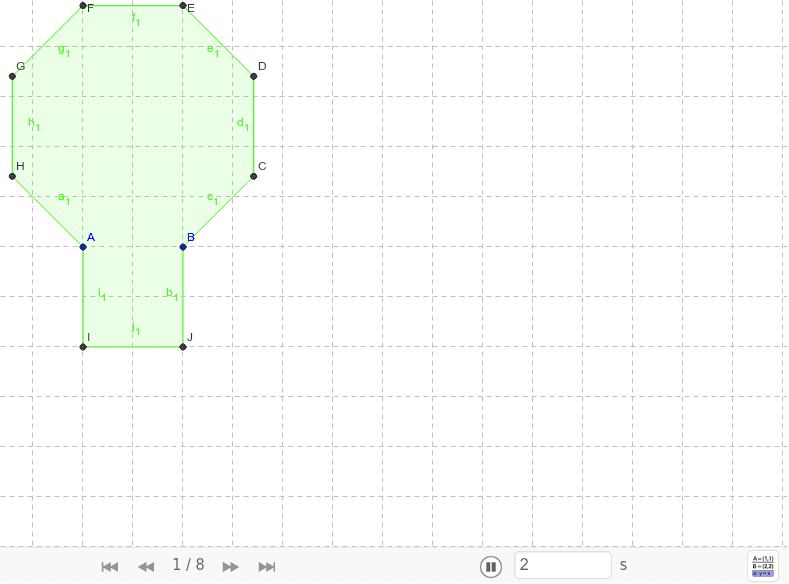
This example demonstrates how to create a tessellation of regular polygons on a plane using translation. Key mathematical concepts include translation, coordinates, and regular polygons. Using GeoGebra commands such as Polygon, Vector, and Translate, multiple regular polygons are constructed and translated to form a beautiful tessellation pattern. Suitable for middle school and above students to learn about geometric transformations and tessellations.
GeoGebra Commands & Parameters
Polygon(A, B, 8) → poly1, a, D, E, F, G, H, b, c, d, e, f, g, h, CPolygon(B, A, 4) → poly2, i, j, k, l, I, JPolygon(I, A, H, G, F, E, D, C, B, J) → poly3, i_1, j_1, a_1, h_1, g_1, f_1, e_1, d_1, c_1, b_1Vector(F, C) → uTranslate(I, u) → I'Translate(A, u) → A'Translate(H, u) → H'Translate(G, u) → G'Translate(F, u) → F'Translate(E, u) → E'Translate(D, u) → D'Translate(C, u) → C'Translate(B, u) → B'Translate(J, u) → J'Polygon(I', A', H', G', F', E', D', C', B', J') → poly3', i', j', a', h', g', f', e', d', c', b'Vector(H, E') → vTranslate(I, v) → I'_1Translate(A, v) → A'_1Translate(H, v) → H'_1Translate(G, v) → G'_1Translate(F, v) → F'_1Translate(E, v) → E'_1Translate(D, v) → D'_1Translate(C, v) → C'_1Translate(B, v) → B'_1Translate(J, v) → J'_1Polygon(I'_1, A'_1, H'_1, G'_1, F'_1, E'_1, D'_1, C'_1, B'_1, J'_1) → poly3'_1, i'_1, j'_1, a'_1, h'_1, g'_1, f'_1, e'_1, d'_1, c'_1, b'_1Vector(J', E') → wTranslate(I', w) → I''Translate(A', w) → A''Translate(H', w) → H''Translate(G', w) → G''Translate(F', w) → F''Translate(E', w) → E''Translate(D', w) → D''Translate(C', w) → C''Translate(B', w) → B''Translate(J', w) → J''Polygon(I'', A'', H'', G'', F'', E'', D'', C'', B'', J'') → poly3'', i'', j'', a'', h'', g'', f'', e'', d'', c'', b''Vector(F'_1, C') → mTranslate(I'_1, m) → KTranslate(A'_1, m) → LTranslate(H'_1, m) → MTranslate(G'_1, m) → NTranslate(F'_1, m) → OTranslate(E'_1, m) → PTranslate(D'_1, m) → QTranslate(C'_1, m) → RTranslate(B'_1, m) → STranslate(J'_1, m) → TPolygon(K, L, M, N, O, P, Q, R, S, T) → poly4, k_1, t, l_1, m_1, n, o, p, q, r, sVector(F, I) → u_1Translate(I, u_1) → I'_2Translate(A, u_1) → A'_2Translate(H, u_1) → H'_2Translate(G, u_1) → G'_2Translate(F, u_1) → F'_2Translate(E, u_1) → E'_2Translate(D, u_1) → D'_2Translate(C, u_1) → C'_2Translate(B, u_1) → B'_2Translate(J, u_1) → J'_2Polygon(I'_2, A'_2, H'_2, G'_2, F'_2, E'_2, D'_2, C'_2, B'_2, J'_2) → poly3'_2, i'_2, j'_2, a'_2, h'_2, g'_2, f'_2, e'_2, d'_2, c'_2, b'_2Vector(B, B'_1) → v_1Translate(I', v_1) → I''_1Translate(A', v_1) → A''_1Translate(H', v_1) → H''_1Translate(G', v_1) → G''_1Translate(F', v_1) → F''_1Translate(E', v_1) → E''_1Translate(D', v_1) → D''_1Translate(C', v_1) → C''_1Translate(B', v_1) → B''_1Translate(J', v_1) → J''_1Polygon(I''_1, A''_1, H''_1, G''_1, F''_1, E''_1, D''_1, C''_1, B''_1, J''_1) → poly3''_1, i''_1, j''_1, a''_1, h''_1, g''_1, f''_1, e''_1, d''_1, c''_1, b''_1Vector(C, I') → w_1Translate(I', w_1) → I''_2Translate(A', w_1) → A''_2Translate(H', w_1) → H''_2Translate(G', w_1) → G''_2Translate(F', w_1) → F''_2Translate(E', w_1) → E''_2Translate(D', w_1) → D''_2Translate(C', w_1) → C''_2Translate(B', w_1) → B''_2Translate(J', w_1) → J''_2Polygon(I''_2, A''_2, H''_2, G''_2, F''_2, E''_2, D''_2, C''_2, B''_2, J''_2) → poly3''_2, i''_2, j''_2, a''_2, h''_2, g''_2, f''_2, e''_2, d''_2, c''_2, b''_2
AI Drawing Prompt Reference
Create a hexagonal tessellation pattern using regular octagons and squares. Start by drawing a regular octagon with points A and B, then draw a square with points B and A. Use vector u from point F to C to translate the square and octagon, forming new shapes. Repeat this process using vector v from point H to E' to translate the previous shapes. Finally, use vector m from point F'_1 to C' to translate the latest shapes, completing the tessellation pattern.
The prompt above was compiled from the original drawing commands and is for reference only.