
Tess 2
Loading the math board and drawing, please wait…
In collections
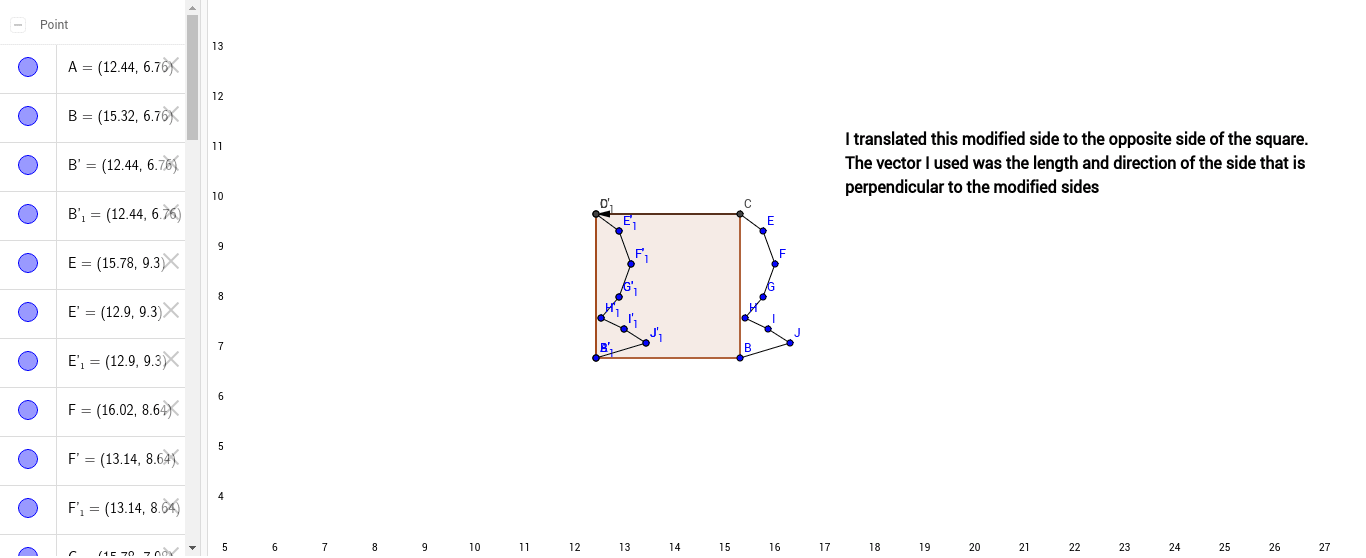
Square Translation Tessalation
This example demonstrates geometric construction of polygons. Key mathematical concepts include polygons, vectors, and transformations. Using commands like Polygon, Segment, Vector, and Translate in GeoGebra, complex polygonal shapes can be constructed. Suitable for high school geometry courses.
GeoGebra Commands & Parameters
Polygon(A, B, 4) → poly1, a, b, c, d, C, DSegment(C, E) → eSegment(E, F) → fSegment(F, G) → gSegment(G, H) → hSegment(H, I) → iSegment(I, J) → jSegment(J, B) → kVector(C, D) → uTranslate(B, u) → B'Translate(C, u) → C'Segment(B', C') → b'Translate(C, u) → C'_1Translate(E, u) → E'Segment(C'_1, E') → e'Translate(E, u) → E'_1Translate(F, u) → F'Segment(E'_1, F') → f'Translate(F, u) → F'_1Translate(G, u) → G'Segment(F'_1, G') → g'Translate(G, u) → G'_1Translate(H, u) → H'Segment(G'_1, H') → h'Translate(H, u) → H'_1Translate(I, u) → I'Segment(H'_1, I') → i'Translate(I, u) → I'_1Translate(J, u) → J'Segment(I'_1, J') → j'Translate(J, u) → J'_1Translate(B, u) → B'_1Segment(J'_1, B'_1) → k'
AI Drawing Prompt Reference
Draw a quadrilateral and connect its vertices in sequence to form a closed shape. Then, using one side of the quadrilateral as a reference, apply vector translation to each vertex, connecting the translated points to form another similar quadrilateral. The final image should show two interrelated quadrilaterals, demonstrating the application of vectors and geometric transformations.
The prompt above was compiled from the original drawing commands and is for reference only.