
Tangram Puzzles
Loading the math board and drawing, please wait…
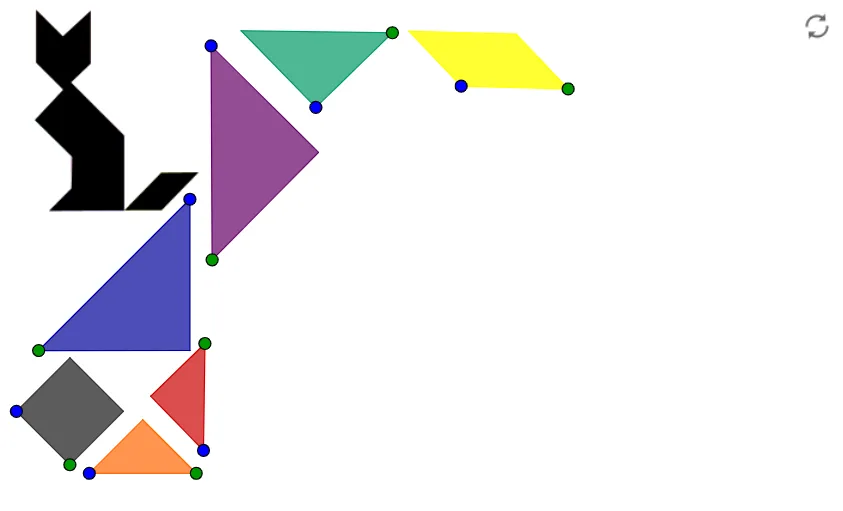
This example demonstrates how to use tangram pieces to form various shapes. It involves core mathematical concepts such as geometric construction, symmetry, rotation, and translation. Key GeoGebra commands and objects used include Point, Segment, Polygon, Rotate, and Circle, as detailed in the construction summary. Suitable for middle school students to learn geometric constructions and spatial reasoning.
GeoGebra Commands & Parameters
Point(Circle[C, a]) → DSegment(C, D) → bSemicircle(C, D) → cMidpoint(b) → EOrthogonalLine(E, b) → dIntersect(c, d, 1) → FPolygon(D, F, C) → poly1, c_1, d_1, fPoint(Circle[G, a]) → HSegment(G, H) → eSemicircle(G, H) → gMidpoint(e) → IOrthogonalLine(I, e) → hIntersect(g, h, 1) → JPolygon(G, H, J) → poly2, j, g_1, h_1Point(Circle[A, a / 2]) → BSegment(A, B) → iOrthogonalLine(A, i) → kCircle(A, B) → pIntersect(p, k, 2) → KPolygon(A, B, K) → poly3, k_1, a_1, b_1Point(Circle[L, a / 2]) → MSegment(L, M) → lSemicircle(L, M) → qMidpoint(l) → NOrthogonalLine(N, l) → mIntersect(q, m, 1) → OPolygon(L, M, O) → poly4, o, l_1, m_1Point(Circle[P, a / 2]) → QSegment(P, Q) → nSemicircle(P, Q) → rMidpoint(n) → ROrthogonalLine(R, n) → sIntersect(r, s, 1) → SPolygon(P, Q, S) → poly5, s_1, p_1, q_1Point(Circle[T, (a * sqrt(2) / 4)]) → USegment(T, U) → tOrthogonalLine(T, t) → e_1OrthogonalLine(U, t) → f_1Circle(T, U) → r_1Circle(U, T) → t_1Intersect(t_1, f_1, 2) → VIntersect(r_1, e_1, 2) → WPolygon(T, U, V, W) → poly6, t_2, u, v, wPoint(Circle[Z, a / 2]) → A_1Segment(Z, A_1) → i_1Rotate(Z, 315°, A_1) → Z'Angle(Z', A_1, Z) → αRay(A_1, Z') → j_1Circle(A_1, (a * sqrt(2) / 4)) → c_2Intersect(c_2, j_1, 1) → B_1Line(Z, j_1) → n_1Line(B_1, i_1) → a_2Intersect(n_1, a_2) → C_1Polygon(A_1, B_1, C_1, Z) → poly7, a_3, b_2, c_3, zPoint(Circle[D_1, a]) → E_1