
Tangents of Right Angles
Loading the math board and drawing, please wait…
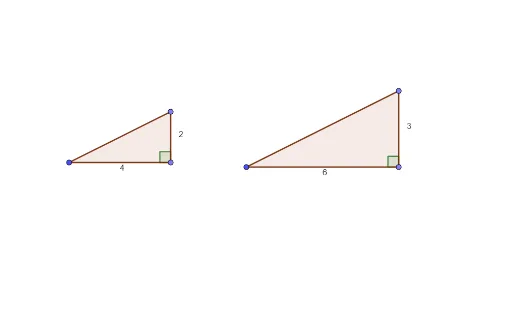
This example demonstrates the application of the tangent function in right triangles. It involves concepts of right triangles, tangent functions, and angles. Using GeoGebra commands such as Point, Segment, Angle, and Polygon, a right triangle is constructed and the changes in the tangent values are observed. Suitable for students at the junior high school level and above to learn about trigonometric functions and geometric constructions.
GeoGebra Commands & Parameters
Point(Circle[D, 4]) → ESegment(D, E) → fPoint(Circle[E, 2]) → ASegment(E, A) → gSegment(D, A) → hAngle(A, E, D) → αPolygon(D, E, A) → t1, a, d, ePoint(Circle[B, 6]) → CSegment(B, C) → iPoint(Circle[C, 3]) → FSegment(C, F) → jSegment(F, B) → kAngle(F, C, B) → βPolygon(B, C, F) → t2, f_1, b, c
AI Drawing Prompt Reference
Draw a right triangle with point D as the right angle vertex, point E and point A as the endpoints of the legs. Draw a line segment from point E to point A, and another from point D to point A, forming a right triangle. Measure the angle DEA and observe the change in tan(∠DEA). Then, draw another right triangle with point B as the right angle vertex, point C and point F as the endpoints of the legs. Draw a line segment from point C to point F, and another from point B to point F, forming another right triangle. Measure the angle FCB.
The prompt above was compiled from the original drawing commands and is for reference only.