
Tangents from an External Point
Loading the math board and drawing, please wait…
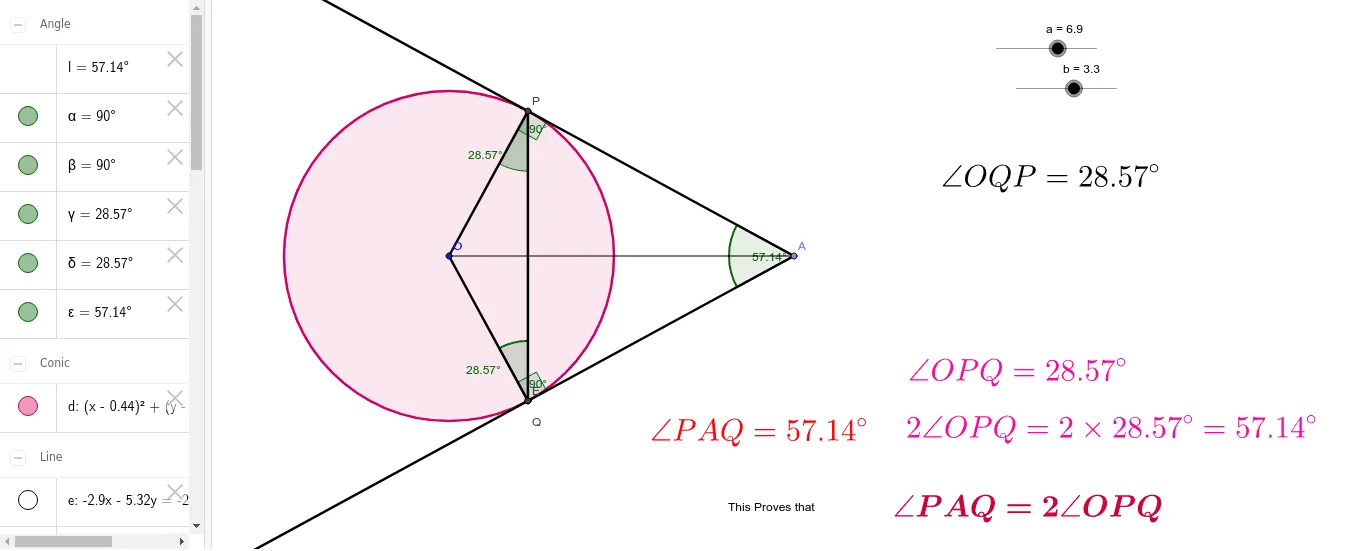
This example demonstrates constructing tangents from an external point to a circle and exploring related geometric properties. Core math concepts include tangent properties, similar triangles, and circle theorems. It is constructed using GeoGebra commands like Point, Segment, Circle, Tangent, Intersect, Ray, and Angle. Suitable for high school mathematics education to understand the tangent length theorem and applications of similar triangles.
GeoGebra Commands & Parameters
Point(Circle[O, a]) → ASegment(O, A) → cCircle(O, b) → dTangent(A, d) → e, fIntersect(d, e, 1) → PIntersect(d, f, 1) → QIntersect(d, f, 1) → ERay(A, Q) → gRay(A, P) → hSegment(O, P) → iSegment(O, Q) → jAngle(O, P, A) → αAngle(A, Q, O) → βSegment(P, Q) → kAngle(O, P, Q) → γAngle(P, Q, O) → δAngle(P, A, Q) → ε
AI Drawing Prompt Reference
Draw a circle and a point outside it. Connect the point to the circle's center. Draw two tangent lines from the point to the circle, marking the points where they touch. Connect the center to each tangent point. From the external point, draw rays through both tangent points. Measure the angles formed, including those between the radius and the tangent, between the tangents themselves, and between the tangent line segments and the line connecting the tangent points to the center. Finally, connect the two tangent points and measure the angle this line segment makes with the radius.
The prompt above was compiled from the original drawing commands and is for reference only.