
Symmetry in Native American Art: Geometric Constructions
Loading the math board and drawing, please wait…
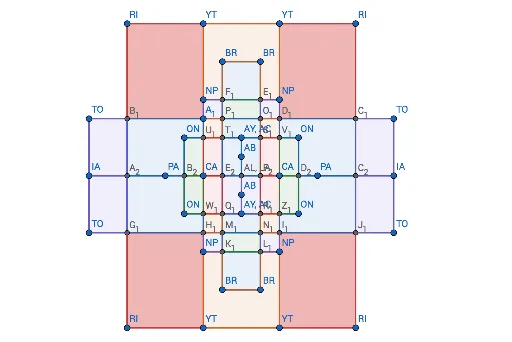
This example demonstrates the construction of symmetric patterns inspired by Native American art using GeoGebra. It involves core mathematical concepts such as symmetry, geometric constructions, polygon formation, probability & statistics, quadrilaterals, and similar triangles. The construction utilizes commands like Point, Intersect, Segment, Polygon, and objects including AY, YT, PA, TO, ON, NP, A, B, C, D, E, F, G, H, I, CA, J, K, AB, L, BR, M, N, O, P, Q, R, RI, S, T, U, IA, V, W, Z, f, g, h, i, j. It is suitable for high school mathematics education, showcasing the intersection of geometric symmetry and artistic design.
GeoGebra Commands & Parameters
Point(yAxis) → AYPoint(xAxis) → PAPoint(xAxis) → BPoint(yAxis) → EPoint(xAxis) → CAPoint(xAxis) → JIntersect(xAxis, yAxis) → KPoint(yAxis) → ABPoint(yAxis) → LPoint(xAxis) → IAPoint(xAxis) → VSegment(D, W) → fSegment(RI, T) → gSegment(P, R) → hSegment(YT, Q) → iSegment(S, U) → jSegment(TO, Z) → kSegment(O, N) → lSegment(BR, M) → mSegment(A, H) → nSegment(ON, G) → pSegment(AY, E) → qSegment(RI, S) → rSegment(D, TO) → sSegment(W, Z) → tSegment(T, U) → aSegment(N, M) → bSegment(I, F) → cSegment(H, G) → dSegment(V, IA) → eSegment(A, ON) → f_1Segment(C, NP) → g_1Segment(O, BR) → h_1Point(h) → A_1Intersect(g, s) → B_1Polygon(RI, P, A_1, B_1) → q1, ri, p_1, a_1, b_1Intersect(j, s) → C_1Intersect(i, s) → D_1Polygon(YT, S, C_1, D_1) → q2, yt, s_1, c_1, d_1Intersect(m, g_1) → E_1Intersect(l, g_1) → F_1Polygon(O, BR, E_1, F_1) → q3, o, br, e_1, f_2Intersect(g, t) → G_1Intersect(h, t) → H_1Polygon(G_1, H_1, R, T) → q4, g_2, h_2, r_1, t_1Intersect(i, t) → I_1Intersect(j, t) → J_1Polygon(I_1, J_1, U, Q) → q5, i_1, j_1, u, q_1Intersect(l, c) → K_1Intersect(m, c) → L_1Polygon(K_1, L_1, M, N) → q6, k_1, l_1, m_1, n_1Intersect(l, t) → M_1Intersect(m, t) → N_1Polygon(M_1, N_1, L_1, K_1) → q7, m_2, n_2, l_2, k_2Intersect(m, s) → O_1Intersect(l, s) → P_1Polygon(F_1, E_1, O_1, P_1) → q8, f_3, e_2, o_1, p_2Polygon(I, K_1, N, M, L_1, F, Q, R) → poly1, i_2, k_3, n_3, m_3, l_3, f_4, q_2, r_2Polygon(C, F_1, O, BR, E_1, NP, YT, P) → poly2, c_2, f_5, o_2, br_1, e_3, np, yt_1, p_3Polygon(N_1, I_1, F, L_1) → q9, n_4, i_3, f_6, l_4Segment(H_1, M_1) → j_2Polygon(H_1, M_1, K_1, I) → q10, h_3, m_4, k_4, i_4Intersect(l, d) → Q_1Intersect(m, d) → R_1Polygon(Q_1, R_1, N_1, M_1) → q11, q_3, r_3, n_5, m_5Polygon(C, F_1, P_1, A_1) → q12, c_3, f_7, p_4, a_2Polygon(E_1, NP, D_1, O_1) → q13, e_4, np_1, d_2, o_3Intersect(m, f_1) → S_1Intersect(l, f_1) → T_1Polygon(P_1, O_1, S_1, T_1) → q14, p_5, o_4, s_2, t_2Intersect(h, f_1) → U_1Polygon(A_1, P_1, T_1, U_1) → q15, a_3, p_6, t_3, u_1Intersect(i, f_1) → V_1Polygon(O_1, D_1, V_1, S_1) → q16, o_5, d_3, v_1, s_3Intersect(h, d) → W_1Polygon(W_1, Q_1, M_1, H_1) → q17, w_1, q_4, m_6, h_4Intersect(i, d) → Z_1Polygon(R_1, Z_1, I_1, N_1) → q18, r_4, z_1, i_5, n_6Intersect(g, e) → A_2Intersect(n, e) → B_2Polygon(A_2, B_2, H, W_1, H_1, G_1) → poly3, a_4, b_2, h_5, w_2, h_6, g_3Intersect(j, e) → C_2Intersect(p, e) → D_2Polygon(Z_1, I_1, J_1, C_2, D_2, G) → poly4, z_2, i_6, j_3, c_4, d_4, g_4Intersect(l, e) → E_2Polygon(E_2, K, E, Q_1) → q19, e_5, k_5, e_6, q_5Polygon(J, E_2, Q_1, W_1) → q20, j_4, e_7, q_6, w_3Polygon(B_2, J, W_1, H) → q21, b_3, j_5, w_4, h_7Intersect(m, e) → F_2Polygon(K, F_2, R_1, E) → q22, k_6, f_8, r_5, e_8Polygon(F_2, CA, Z_1, R_1) → q23, f_9, ca, z_3, r_6Polygon(CA, D_2, G, Z_1) → q24, ca_1, d_5, g_5, z_4Polygon(A, U_1, J, B_2) → q25, a_5, u_2, j_6, b_4Polygon(U_1, T_1, E_2, J) → q26, u_3, t_4, e_9, j_7Polygon(T_1, AY, K, E_2) → q27, t_5, ay, k_7, e_{10}Polygon(AY, S_1, F_2, K) → q28, ay_1, s_4, f_{10}, k_8Polygon(S_1, V_1, CA, F_2) → q29, s_5, v_2, ca_2, f_{11}Polygon(V_1, ON, D_2, CA) → q30, v_3, on, d_6, ca_3Polygon(B_1, A_1, U_1, A, B_2, A_2) → poly5, b_5, a_6, u_4, a_7, b_6, a_8Polygon(D, B_1, A_2, V) → q31, d_7, b_7, a_9, vPolygon(V, A_2, G_1, W) → q32, v_4, a_{10}, g_6, wPolygon(D_1, C_1, C_2, D_2, ON, V_1) → poly6, d_8, c_5, c_6, d_9, on_1, v_5Polygon(C_1, TO, IA, C_2) → q33, c_7, to, ia, c_8Polygon(C_2, IA, Z, J_1) → q34, c_9, ia_1, z_5, j_8
AI Drawing Prompt Reference
Create a symmetric pattern inspired by Native American art. Start by creating points on the x-axis (B, CA, J) and y-axis (AY, AB, L, IA, V). Then construct multiple segments to form triangles and quadrilaterals, ultimately creating a complex symmetric pattern. Ensure symmetry by mirroring each part across the axes.
The prompt above was compiled from the original drawing commands and is for reference only.