
Symmetry Design
Loading the math board and drawing, please wait…
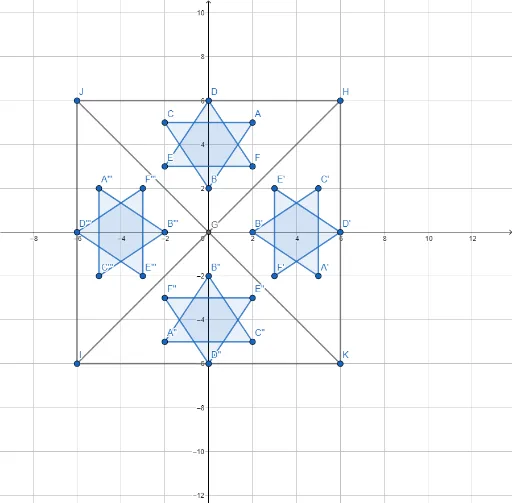
This example demonstrates the geometric construction of a symmetric design. It involves key mathematical concepts such as symmetry and continuity. Using GeoGebra commands like Point, Polygon, Intersect, Rotate, and Segment, a symmetric figure can be constructed. Suitable for high school geometry education, it helps students understand the application of symmetry in geometry.
GeoGebra Commands & Parameters
Point(yAxis) → BPolygon(A, B, C) → t1, c, a, bPolygon(D, E, F) → t2, f, d, eIntersect(xAxis, yAxis) → GRotate(A, (-(90°)), G) → A'Rotate(B, (-(90°)), G) → B'Rotate(C, (-(90°)), G) → C'Polygon(A', B', C') → t1', c', a', b'Rotate(D, (-(90°)), G) → D'Rotate(E, (-(90°)), G) → E'Rotate(F, (-(90°)), G) → F'Polygon(D', E', F') → t2', f', d', e'Rotate(A', (-(90°)), G) → A''Rotate(B', (-(90°)), G) → B''Rotate(C', (-(90°)), G) → C''Polygon(A'', B'', C'') → t1'', c'', a'', b''Rotate(D', (-(90°)), G) → D''Rotate(E', (-(90°)), G) → E''Rotate(F', (-(90°)), G) → F''Polygon(D'', E'', F'') → t2'', f'', d'', e''Rotate(A'', (-(90°)), G) → A'''Rotate(B'', (-(90°)), G) → B'''Rotate(C'', (-(90°)), G) → C'''Polygon(A''', B''', C''') → t1''', c''', a''', b'''Rotate(D'', (-(90°)), G) → D'''Rotate(E'', (-(90°)), G) → E'''Rotate(F'', (-(90°)), G) → F'''Polygon(D''', E''', F''') → t2''', f''', d''', e'''Segment(H, I) → gSegment(J, K) → hSegment(J, I) → iSegment(I, K) → jSegment(K, H) → kSegment(H, J) → l