
Surface Solid: Constructing a 3D Solid from Parametric Surfaces and Polygons
Loading the math board and drawing, please wait…
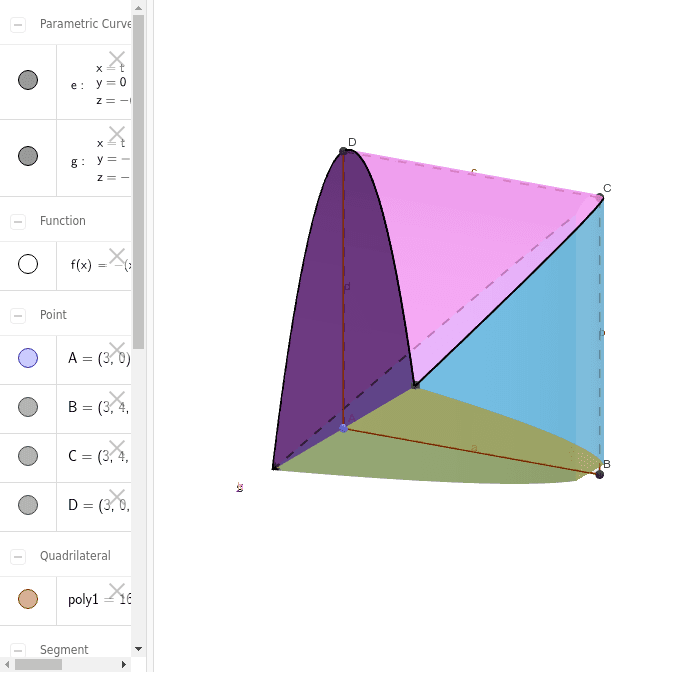
① This example demonstrates how to build a three-dimensional solid-like object in GeoGebra by combining parametric surfaces (Surface command) with points, polygons, and curves, offering a visual representation of spatial geometry. ② The core mathematical concepts include parametric surfaces in calculus, derivatives (for tangent planes or normals), solid geometry, and real-valued functions, along with basic polygon constructions. ③ Construction highlights: Based on the summary, the commands used are Point, Polygon, CurveCartesian, and Surface; objects include points A, B, C, D, polygon poly1, curves a, b, c, d, e, and surfaces g, h, i, j, k, which are assembled to create a composite surface solid. ④ This is suitable for high school to university-level mathematics, particularly in calculus, analytic geometry, or computer-aided geometric design, helping learners understand parametric surface generation and solid modeling, and useful for classroom demonstrations or mathematical visualization.
GeoGebra Commands & Parameters
Point(Segment[(1, 0), (5, 0)]) → APolygon(A, B, C, D) → poly1, a, b, c, dCurveCartesian(t, 0, f(t), t, 1, 5) → eCurveCartesian(t, f(t), f(t), t, 1, 5) → gSurface((u * t) + ((1 - u) * t), ((1 - u) * f(t)), (u * f(t)) + ((1 - u) * f(t)), t, 1, 5, u, 0, 1) → hSurface((u * t) + ((1 - u) * t), (u * f(t)) + ((1 - u) * f(t)), (u * f(t)), t, 1, 5, u, 0, 1) → iSurface((u * t) + ((1 - u) * t), 0, ((1 - u) * f(t)), t, 1, 5, u, 0, 1) → jSurface((u * t) + ((1 - u) * t), ((1 - u) * f(t)), 0, t, 1, 5, u, 0, 1) → k