
Surface Sequence Curve: Exploring Ellipse and Sequence Geometry
Loading the math board and drawing, please wait…
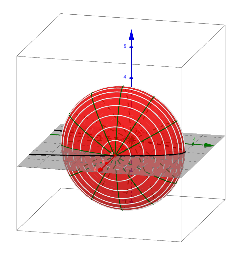
This example demonstrates the relationship between ellipses and sequences through geometric construction. Key mathematical concepts include ellipse equations, sequence definitions, and parametric representation. The construction uses GeoGebra commands like Surface, Sequence with objects f, a, b, and list1. Suitable for high school students learning coordinate geometry and sequence applications, or for mathematical modeling education.
GeoGebra Commands & Parameters
Surface(t, (f(t) * cos(u)), (f(t) * sin(u)), t, 0, 4, u, 0, 6.283185307179586) → aSequence(CurveCartesian[t, (f(t) * cos(u)), (f(t) * sin(u)), u, 0, 6.283185307179586], t, 0, 4, 0.25) → bSequence(CurveCartesian[t, (f(t) * cos(u)), (f(t) * sin(u)), t, 0, 4], u, 0, 6.28319, 0.5235987755982988) → list1
AI Drawing Prompt Reference
Draw an ellipse sequence curve where the ellipse equation is x^2/a^2 + y^2/b^2 = 1, with a and b as functions of parameter t, ranging from 0 to 4. Then, generate a series of ellipses with t as the parameter, ranging from 0 to 4, with an interval of 0.25. Finally, generate a series of ellipses with u as the parameter, ranging from 0 to 2π, with an interval of 0.5236.
The prompt above was compiled from the original drawing commands and is for reference only.