
Surface of Revolution with Volume Element
Loading the math board and drawing, please wait…
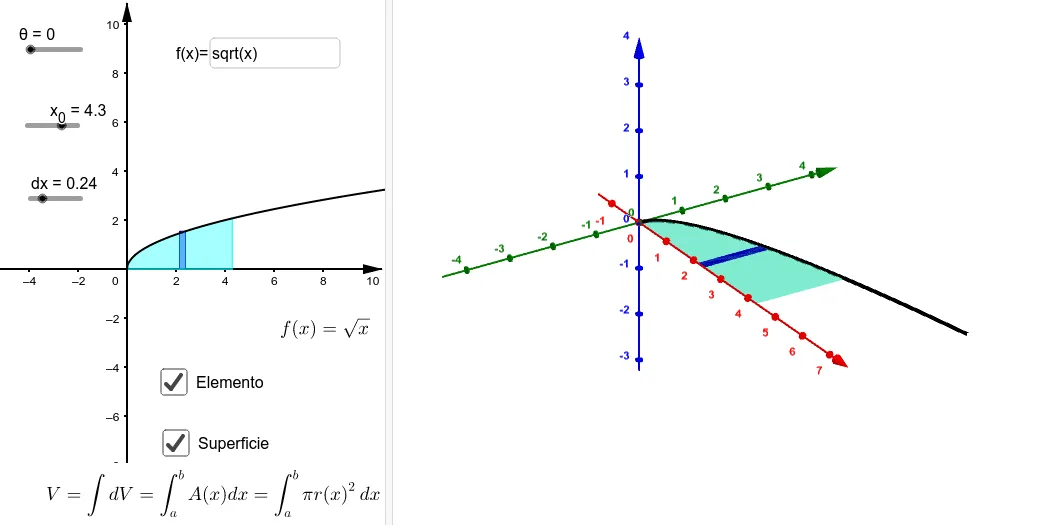
This example demonstrates how to generate a 3D surface of revolution from a 2D shape and calculate its volume using integral calculus. Key math concepts include integral computation, volume formulas for rotational solids, function graphs, and geometric transformations. GeoGebra commands used are Surface, Polygon, RectangleSum, Integral, and Textfield. Suitable for high school and above students learning calculus, solid geometry, and volume calculations in engineering applications.
GeoGebra Commands & Parameters
Surface(b, (f(b) * cos(a)), (f(b) * sin(a)), b, 0, x_0, a, 0, θ) → bSurface(t, ((s * f(t)) * cos(θ)), ((s * f(t)) * sin(θ)), t, 0, x_0, s, 0, 1) → aSurface(x_0, ((s * f(x_0)) * cos(t)), ((s * f(x_0)) * sin(t)), t, 0, θ, s, 0, 1) → cSurface(xE, ((s * f(xE)) * cos(t)), ((s * f(xE)) * sin(t)), t, 0, θ, s, 0, 1) → Ec1Surface(xE + dx, ((s * f(xE)) * cos(t)), ((s * f(xE)) * sin(t)), t, 0, θ, s, 0, 1) → Ec2Surface(t, ((s * f(xE)) * cos(θ)), ((s * f(xE)) * sin(θ)), t, xE, xE + dx, s, 0, 1) → Ec3Polygon({(xE, 0, 0), (xE, fc(xE, θ), fs(xE, θ)), (xE + dx, fc(xE, θ), fs(xE, θ)), (xE + dx, 0, 0), (xE, 0, 0)}) → ERRectangleSum(f, xE, xE + dx, 1, 1) → dRectangleSum(f, xE, xE + dx, 1, 1) → eSurface(t, (f(xE) * cos(s)), (f(xE) * sin(s)), t, xE, xE + dx, s, 0, θ) → Ec4Integral(f, 0, x_0) → gTextfield(f) → CasillaDeEntrada1