
Surface Area of Rectangular Prisms
Loading the math board and drawing, please wait…
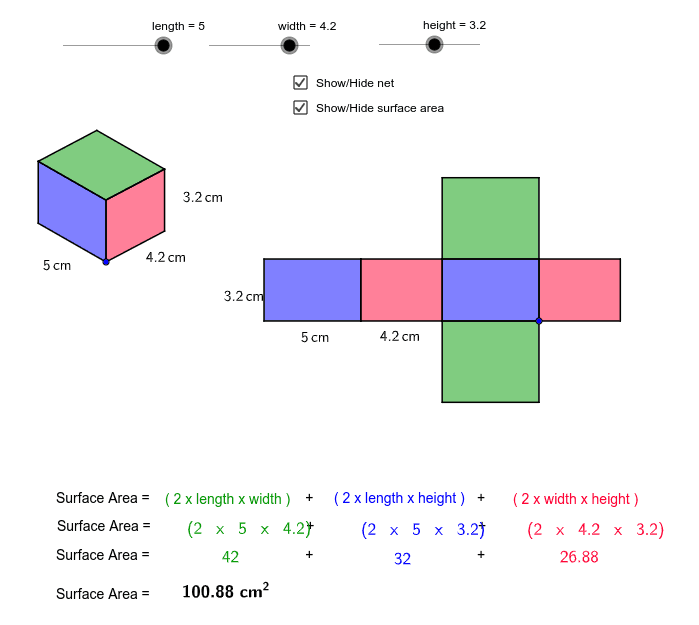
Explore the net of a rectangular prism to understand how to calculate its surface area. This example involves geometric construction using vectors, polygons, and lines in GeoGebra. Suitable for middle school and above students studying solid geometry.
GeoGebra Commands & Parameters
Vector(A, B) → uVector(A, C) → vVector(A, D) → wTranslate(E, Vector[height * u]) → E'Vector(E, E') → zTranslate(E, Vector[width * w]) → E'_1Translate(E, Vector[length * v]) → E'_2Translate(E'_2, Vector[height * u]) → FTranslate(E'_1, Vector[height * u]) → GPolygon(F, E'_2, E, E') → poly1, f, e'_2, e, e'Polygon(E, E'_1, G, E') → poly2, e_1, e'_1, g, e'_3Line(F, g) → dLine(G, e') → hIntersect(d, h) → HPolygon(F, E', G, H) → poly3, f_1, e'_4, g_1, h_1Polygon(J, I, K, L) → poly4, j, i, k, lPolygon(N, J, I, M) → poly5, n, j_1, i_1, mPolygon(N, P, O, M) → poly6, n_1, p, o, m_1Polygon(Q, R, N, J) → poly7, q, r, n_2, j_2Polygon(T, S, I, M) → poly8, t, s, i_2, m_2Polygon(V, U, O, P) → poly9, v_1, u_1, o_1, p_1Midpoint(e'_2) → WMidpoint(e_1) → ZMidpoint(e'_1) → A_1Midpoint(v_1) → B_1Midpoint(u_1) → C_1Midpoint(o) → D_1Midpoint(m_2) → E_1Midpoint(t) → F_1
AI Drawing Prompt Reference
Draw a rectangular prism and its net to explore surface area calculation. Start by using vectors to represent three adjacent edges of the prism, then translate and scale these vectors to create the faces of the net. Connect the vertices to form closed polygons for the bottom, sides, and top. Finally, calculate and mark the midpoints of key vertices to highlight the geometric properties.
The prompt above was compiled from the original drawing commands and is for reference only.