
Surface Area for Cuboid
Loading the math board and drawing, please wait…
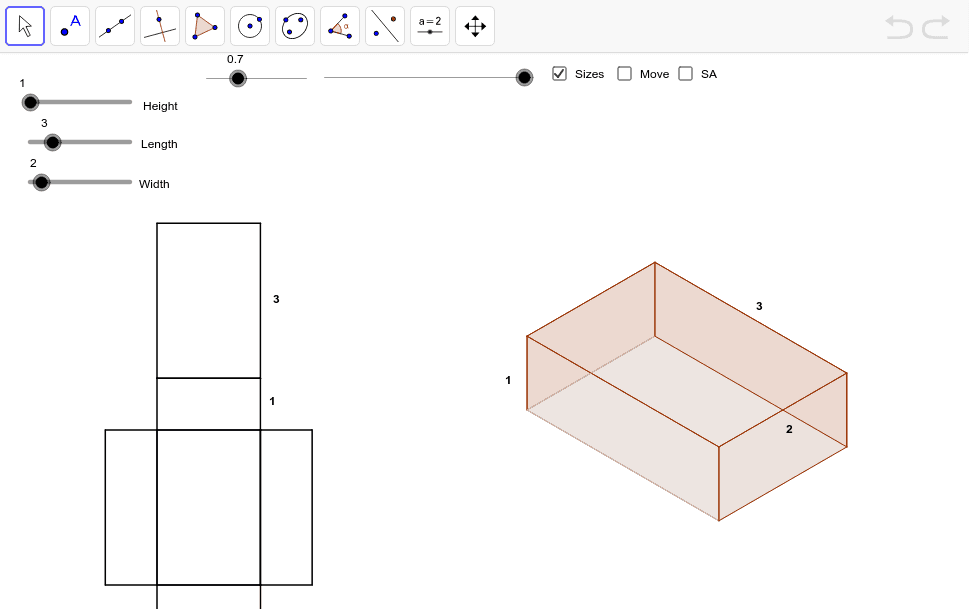
This example demonstrates the dynamic folding of a cuboid from a planar shape into a three-dimensional solid. The key mathematical concepts involve surface area calculation in solid geometry, geometric transformations, and parametric modeling. Construction involves using GeoGebra commands such as Vector, Polygon, If, Midpoint, Area to build cuboid objects, with adjustable sliders to modify dimensions and observe surface area changes. Suitable for middle or high school mathematics education to understand geometric volume and surface area relationships, and dynamic geometric modeling applications.
GeoGebra Commands & Parameters
Vector(PTP_1, PB_3) → tpsbVector(PTPF_1, PTP_1) → tpf1Vector(PTP, PB_2) → tpa1Vector(PTPF, PTP) → tpfVector(PBK, PB) → bk1Vector(PBK_1, PB_1) → bk11Vector(PFT_1, PB_3) → ftb13Vector(PFT, PB_2) → fta1Vector(PSB_1, PB_3) → sbb13Vector(PSB, PB_1) → sbbVector(PSF_1, PB_2) → sfa1Vector(PSF, PB) → sfbPolygon(SF_3, SF, SF_1, SF_2) → aSideFront, a, b, c, dIf(dist < 100.0, PTPF + (dist * Length[tpf] / 100.0; Angle[tpf]), PTP + ((dist - 100.0) * Length[tpa1] / 100.0; Angle[tpa1])) → TP_3If(dist < 100.0, PTPF_1 + (dist * Length[tpf1] / 100.0; Angle[tpf1]), PTP_1 + ((dist - 100.0) * Length[tpsb] / 100.0; Angle[tpsb])) → TP_2Polygon(TP_3, TP_2, TP_1, TP) → aTop, a_1, b_1, c_1, d_1Polygon(BK_3, BK_2, BK_1, BK) → aBack, a_2, b_2, c_2, d_2Polygon(BT, BT_1, BT_2, BT_3) → aBottom, a_3, b_3, c_3, d_3Polygon(SB, SB_1, SB_2, SB_3) → aSideBack, a_4, b_4, c_4, d_4Polygon(FT, FT_1, FT_2, FT_3) → aFront, a_5, b_5, c_5, d_5Polygon(NA_2, NA, NA_1, NA_3) → planBottom, na_2, na, na_1, na_3Polygon(NA_2, NA_3, NFT_1, NFT) → planFront, na_4, na_5, nft_1, nftPolygon(NA, NSF, NSF_1, NA_2) → planSideFront, na_6, nsf, nsf_1, na_7Polygon(NA_1, NSB, NSB_1, NA_3) → planSideBack, na_8, nsb, nsb_1, na_9Polygon(NA, NBK, NBK_1, NA_1) → planBack, na_{10}, nbk, nbk_1, na_{11}Polygon(NBK, NTPT, NTPF_1, NBK_1) → planTop, nbk_2, ntpt, ntpf_1, nbk_3Midpoint(nft_1) → HnfMidpoint(ntpf_1) → HplMidpoint(nbk_1) → HpbMidpoint(b_1) → HXtsMidpoint(d_2) → HXbsMidpoint(c_5) → HXfsArea(BK_3, BK_2, BK_1, BK) → bb
AI Drawing Prompt Reference
Draw a three-dimensional cuboid formed by folding a planar shape. The figure includes a planar base and six faces: front, back, left, right, top, and bottom. Each face is a rectangle, formed by folding the planar shape. The construction order is to first draw the planar base, then adjust the dimensions of each face based on parameters, and finally connect all faces to form the complete cuboid.
The prompt above was compiled from the original drawing commands and is for reference only.