
Supplementary Angles Demo
Loading the math board and drawing, please wait…
In collections
Angles!
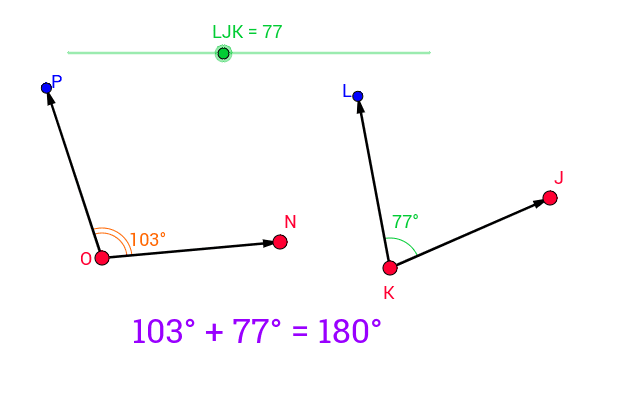
This example demonstrates the relationship between supplementary angles, where the sum of two angles equals 180 degrees. Core math concepts include the definition of supplementary angles, angle measurement, and geometric construction. It utilizes GeoGebra commands like Rotate, Angle, Line, Point, and Vector. Suitable for middle school mathematics education to visually explain supplementary angle properties and develop spatial reasoning skills.
GeoGebra Commands & Parameters
Rotate(J, LJK°, K) → LAngle(J, K, L) → αLine(K, J) → dLine(K, L) → ePoint(d) → L_1Point(e) → MVector(K, L_1) → zVector(K, M) → fRotate(N, (180 - LJK)°, O) → PAngle(N, O, P) → βVector(O, N) → uVector(O, P) → vVector(K, J) → wVector(K, L) → a
AI Drawing Prompt Reference
Draw a geometric figure showing supplementary angles. The figure should include two angles whose sum is 180 degrees. Key objects are a point, two line segments, and two vectors. The construction order is to first determine a point, then draw two line segments, and then use rotation and angle measurement to illustrate the relationship between the two angles. Ensure the figure is clear for understanding the principle of supplementary angles.
The prompt above was compiled from the original drawing commands and is for reference only.