
Sum of Angles in a Quadrilateral by Priyanka
Loading the math board and drawing, please wait…
In collections
Intro to Angles
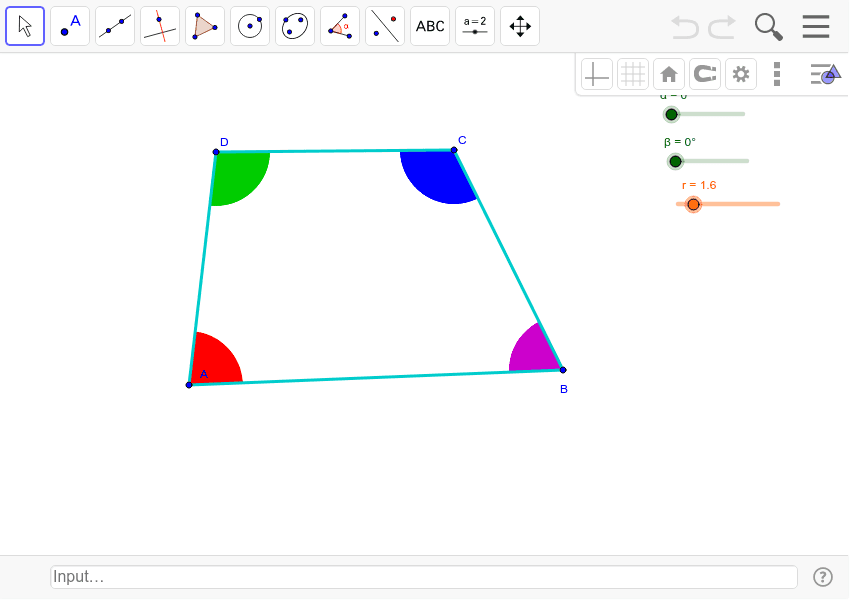
This example demonstrates the sum of angles in a quadrilateral, illustrating that the total internal angles of any quadrilateral sum up to 360 degrees. Key math concepts include polygons, angle measurement, and geometric construction. It uses GeoGebra commands like Polygon, Segment, Midpoint, Circle, Intersect, CircleSector, Rotate, and Sector to construct the quadrilateral and its internal angles, visually showing angle relationships through rotation and sectors. Suitable for middle school and above students to understand the theorem and geometric construction techniques.
GeoGebra Commands & Parameters
Polygon(A, B, C, D) → veelhoek1, a, b, c, dSegment(A, C) → eMidpoint(b) → GMidpoint(d) → HCircle(A, r) → fCircle(B, r) → gCircle(C, r) → hCircle(D, r) → kIntersect(f, a, 1) → EIntersect(f, d, 1) → IIntersect(g, a, 1) → JIntersect(g, b, 1) → KIntersect(h, b, 1) → LIntersect(h, c, 1) → MIntersect(k, c, 1) → NIntersect(k, d, 1) → OCircleSector(A, E, I) → pCircleSector(C, M, L) → qCircleSector(D, O, N) → sRotate(D, α, H) → D'Rotate(O, α, H) → O'Rotate(N, α, H) → N'Sector(Rotate[Circle[D, O], α, H], O', N') → s'Rotate(C, (-α), G) → C'Rotate(M, (-α), G) → M'Rotate(L, (-α), G) → L'Sector(Rotate[Circle[C, M], (-α), G], M', L') → q'CircleSector(B, K, J) → tMidpoint(a) → FRotate(M', (-β), F) → M''Rotate(L', (-β), F) → L''Sector(Rotate[Rotate[Circle[C, M], (-α), G], (-β), F], M'', L'') → q''Rotate(t, (-β), F) → t'
AI Drawing Prompt Reference
Draw a quadrilateral and show that the sum of its interior angles is 360 degrees. First, construct the quadrilateral. Then, draw circles centered at each vertex, intersecting to form diagonals. Next, create new shapes by connecting the intersection points of these diagonals. After that, draw sectors centered at each vertex to represent the interior angles of the quadrilateral. Finally, rotate and move the sectors to visually demonstrate that the sum of the angles equals 360 degrees.
The prompt above was compiled from the original drawing commands and is for reference only.