
String Art & Symmetry
Loading the math board and drawing, please wait…
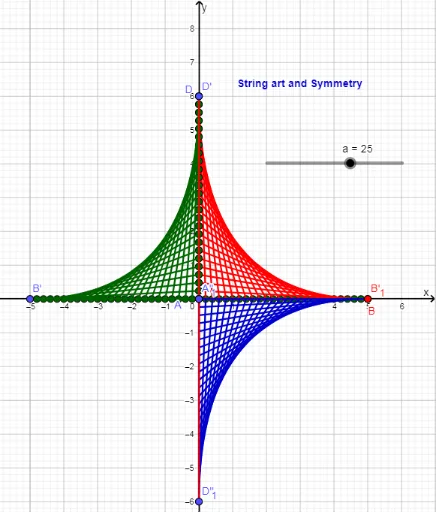
This example demonstrates how string art can be used to visualize symmetry, involving core mathematical concepts like trigonometric functions and spheres. Construction highlights the use of GeoGebra commands such as Sequence, Segment, and Mirror, along with objects like lines and points, to dynamically construct symmetric patterns. Suitable for high school and above students to explore geometric symmetry, trigonometric applications, and dynamic geometric constructions.
GeoGebra Commands & Parameters
Sequence((i / a * A) + ((a - i) / a * D), i, 0, a) → L_2Sequence((i / a * B) + ((a - i) / a * A), i, 0, a) → L_1Segment(D, A) → gSequence(Segment[Element[L_1, i], Element[L_2, i]], i, 1, a + 1) → L_3Mirror(L_2, yAxis) → L_4Mirror(L_1, yAxis) → L_5Mirror(L_3, yAxis) → L_6Mirror(D, yAxis) → D'Mirror(A, yAxis) → A'Segment(D', A') → g'Mirror(B, yAxis) → B'Mirror(L_3, xAxis) → L_7Mirror(D, xAxis) → D'_1Mirror(A, xAxis) → A'_1Segment(D'_1, A'_1) → g'_1Mirror(D', xAxis) → D''Mirror(A', xAxis) → A''Segment(D'', A'') → g''Mirror(B, xAxis) → B'_1
AI Drawing Prompt Reference
Create a string art pattern with fourfold symmetry. Start with a quadrilateral defined by four corner points. Along one side, generate a series of equally spaced points, and along an adjacent side, generate another series. Connect corresponding points from these two series with straight segments to form a fan of crossing lines. Then, mirror this entire set of lines and their endpoints across the vertical axis to create a right-side copy, and mirror both sets across the horizontal axis to complete the bottom half. The final image shows four symmetric groups of radiating line segments, creating a dense, curved visual effect reminiscent of a sphere or hyperbolic surface.
The prompt above was compiled from the original drawing commands and is for reference only.