
Straight Line Equations Demo
Loading the math board and drawing, please wait…
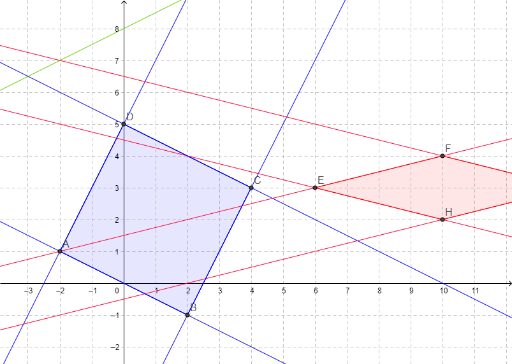
This example demonstrates the plotting of straight line equations and the calculation of their intersections. It involves core mathematical concepts such as line equations, coordinate geometry, and intersection computations. Key GeoGebra commands and objects used include Intersect, Polygon, and Point for constructing the geometry. Suitable for high school students and teachers learning coordinate geometry.
GeoGebra Commands & Parameters
Intersect(g, h) → AIntersect(f, h) → BPolygon(A, B, 4) → Square, n, p, q, r, C, DIntersect(j, l) → EIntersect(k, l) → FIntersect(k, m) → GIntersect(j, m) → HPolygon(E, F, G, H) → Rhombus, e, f_1, g_1, h_1Point(Circle[I, 4.47213595499958]) → JPolygon(I, J, K) → Triangle, k_1, i_1, j_1
AI Drawing Prompt Reference
Draw two lines and find their intersections. Use the intersections to construct a square and a rhombus. Then draw a circle, find its intersections with the square, and construct a triangle using one of the square's corners and the circle's intersections.
The prompt above was compiled from the original drawing commands and is for reference only.