
Still Point
Loading the math board and drawing, please wait…
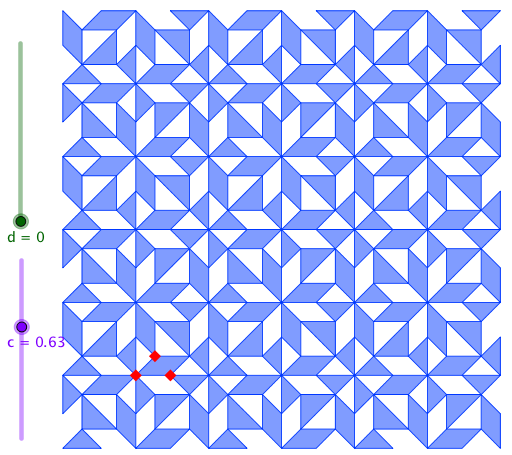
This example demonstrates the concept of a still point through geometric transformations, involving symmetry, rotation, and mirroring. It uses commands such as Point, Rotate, Polygon, Mirror, Line, and Sequence in GeoGebra. Suitable for high school mathematics education, particularly in coordinate geometry and transformation geometry.
GeoGebra Commands & Parameters
Point(Ray[A + (1, 0), A + (2, 0)]) → BRotate(B, 90°, A) → DPoint(Ray[A, C]) → EPolygon(A, E, F, B) → poly1, a, e, f, bMirror(B, x = x(F)) → B'Mirror(A, y = y(E)) → A'Polygon(E, A', G, H) → poly4, e_1, a'_1, g, hMirror(E, Line[F, H]) → E'_1Polygon(F, H, E'_1) → poly5, e'_1, f_1, h_1Mirror(A', Line[F, H]) → A''Mirror(A, Line[F, H]) → A'_1Polygon(E'_1, A'', A'_1) → poly6, a'_2, e'_2, a''Mirror(B, Line[F, H]) → B'_1Polygon(B', F, B'_1) → poly7, b'_1, b'_2, f_2Line(A, D) → iMirror(B, i) → B'_2Mirror(B', i) → B''Mirror(E, i) → E'Mirror(F, i) → F'Mirror(B'_1, i) → IMirror(H, i) → H'Mirror(E'_1, i) → JMirror(A'', i) → A'''Mirror(A'_1, i) → KPolygon(H', G, A''', J) → poly2, h', g_1, a''', jPolygon(J, K, I, F') → poly3, j_1, k, i_1, f'Polygon(H', E', F') → poly8, f'_1, h'_1, e'Polygon(A, E', A') → poly9, a', a_1, e'_3Polygon(B'', F', B'_2) → poly10, b'_3, b'', f'_2Sequence(Rotate[list1, ((i * 180))°, A], i, 1, 2) → list3Sequence(Rotate[list2, ((i * 180))°, A], i, 1, 2) → list4Rotate(u, 90°) → u'Sequence(Sequence[Translate[list3, Vector[(i * u) + (j * u')]], i, 0, 2], j, 0, 2) → list5Sequence(Sequence[Translate[list4, Vector[(i * u) + (j * u')]], i, 0, 2], j, 0, 2) → list6
AI Drawing Prompt Reference
Start from a central point, take a point on a ray and rotate it 90 degrees around the center to get another point, then take a point on another ray. Use these to form a quadrilateral. Mirror some points across vertical and horizontal lines, then mirror multiple points across a slanted line to create symmetric triangles and quadrilaterals. Next, mirror all key points across the line connecting the center and the rotated point, generating more symmetric shapes. Finally, rotate the entire figure 180 degrees around the center to make a copy, and translate both sets along two perpendicular directions to form a 3-by-3 grid, resulting in a complex symmetric geometric pattern.
The prompt above was compiled from the original drawing commands and is for reference only.