
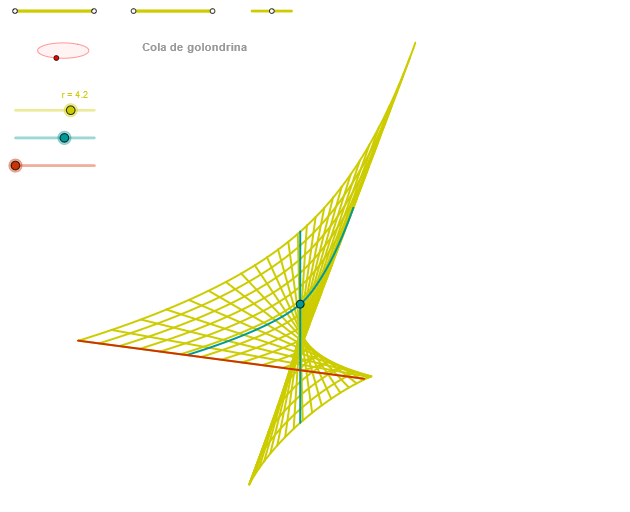
Step Function and Geometric Construction: Cola de golondrina
Loading the math board and drawing, please wait…
In collections
geometriadinamica.es
This example demonstrates the relationship between step functions and geometric constructions. Key mathematical concepts include step functions, logic, lines, arithmetic mean, and averages. Construction involves GeoGebra commands such as Segment, Point, OrthogonalLine, Circle, Intersect, Ellipse, Angle, CurveCartesian, and Sequence. Suitable for middle or high school mathematics education to understand the application of function graphs in geometric contexts.
GeoGebra Commands & Parameters
Segment(Q5, Q6) → p5Point(p5) → P5Segment(Q3, Q4) → p2Point(p2) → P3Segment(P3, Q4) → p4Point(p4) → P4Segment(Q1, Q2) → p1Point(p1) → P1Segment(P1, Q2) → p3Point(p3) → P2OrthogonalLine(C, yAxis) → zz1Circle(C, 0.62) → zz0Intersect(zz0, zz1, 1) → ZZ1Intersect(zz0, zz1, 2) → ZZ2Ellipse(ZZ1, ZZ2, 0.65) → zElipse1Intersect(zElipse1, zz1) → ZZ5, ZZ6Point(zElipse1) → XYAngle(ZZ6, C, XY) → zAngRotOrthogonalLine(C, xAxis) → zz2Intersect(zz0, zz2, 2) → ZZ3Intersect(zz0, zz2, 1) → ZZ4Ellipse(ZZ3, ZZ4, 0.65) → zElipse2Intersect(zElipse2, zz2) → ZZ7, ZZ8Point(zElipse2) → ZAngle(ZZ8, C, Z) → zAngIncCurveCartesian(0, ((r * u) * cos(zAngInc)), u, u1, u2) → curva1Segment(ZZ5, ZZ6) → zz4Segment(ZZ7, ZZ8) → zz3Intersect(zElipse2, zElipse1, 1) → zPunto1Intersect(zElipse2, zElipse1, 4) → zPunto2Segment(zPunto1, zPunto2) → zSeg2CurveCartesian((r * ((((3 * v^(4)) + (α * v^(2))) * sin(zAngRot)) + (((-4 * v^(3)) - ((2 * α) * v)) * cos(zAngRot)))), (r * ((((-((3 * v^(4)) + (α * v^(2)))) * cos(zAngRot)) * sin(zAngInc)) + ((((-4 * v^(3)) - ((2 * α) * v)) * sin(zAngRot)) * sin(zAngInc)) + (α * cos(zAngInc)))), v, v1, v2) → curva2CurveCartesian((r * ((((3 * β^(4)) + (u * β^(2))) * sin(zAngRot)) + (((-4 * β^(3)) - ((2 * u) * β)) * cos(zAngRot)))), (r * ((((-((3 * β^(4)) + (u * β^(2)))) * cos(zAngRot)) * sin(zAngInc)) + ((((-4 * β^(3)) - ((2 * u) * β)) * sin(zAngRot)) * sin(zAngInc)) + (u * cos(zAngInc)))), u, u1, u2) → aSequence(CurveCartesian[(r * ((((3 * v^(4)) + (u * v^(2))) * sin(zAngRot)) + (((-4 * v^(3)) - ((2 * u) * v)) * cos(zAngRot)))), (r * ((((-((3 * v^(4)) + (u * v^(2)))) * cos(zAngRot)) * sin(zAngInc)) + ((((-4 * v^(3)) - ((2 * u) * v)) * sin(zAngRot)) * sin(zAngInc)) + (u * cos(zAngInc)))), u, u1, u2], v, v1, v2, paso) → list2Sequence(CurveCartesian[(r * ((((3 * v^(4)) + (u * v^(2))) * sin(zAngRot)) + (((-4 * v^(3)) - ((2 * u) * v)) * cos(zAngRot)))), (r * ((((-((3 * v^(4)) + (u * v^(2)))) * cos(zAngRot)) * sin(zAngInc)) + ((((-4 * v^(3)) - ((2 * u) * v)) * sin(zAngRot)) * sin(zAngInc)) + (u * cos(zAngInc)))), v, v1, v2], u, u1, u2, (3.5 * paso)) → list1
AI Drawing Prompt Reference
On a coordinate plane, draw a vertical and a horizontal axis and choose a point C as a circle center. Construct a circle centered at C with a fixed radius (e.g., 0.62), then create two perpendicular reference lines through the axes and obtain two sets of intersection points between the circle and these lines. Use each pair of intersection points to build two ellipses with a given geometric parameter (e.g., 0.65). Intersect the ellipses with the corresponding reference lines to get key angle-defining points, then use the resulting rotation and incremental angle relations to drive parametric equations that generate two Cartesian curves. Finally, sample the parametric curves with a step (a sequence parameter) to produce a stepped, curve-like geometric construction.
The prompt above was compiled from the original drawing commands and is for reference only.